Enforce SRI across every script with Integrity-Policy
CentralCSP Team ·
Last update:
Subresource Integrity (SRI) protects one element at a time. You hash a file, paste the digest into that tag's integrity attribute, and the browser checks it. The next script someone adds without a hash is unprotected, and nothing tells you. The Integrity-Policy response header fixes the scope problem: it requires SRI on every script with one header, and reports the ones that are missing it.
The short version: send Integrity-Policy: blocked-destinations=(script) and the browser blocks any script that loads without valid integrity metadata. Add an endpoints=() directive plus a Reporting-Endpoints header and it reports each blocked script as an integrity-violation report. A report-only variant lets you measure the gap before you enforce. This post covers the syntax, the reporting wiring, and how it turns SRI from a per-tag opt-in into a site-wide rule.
Recent availability
Integrity-Policy enforcement for the script destination recently became available across current Chrome, Firefox, and Safari, and Firefox has gained endpoint delivery. It is still recent and not yet Baseline, so confirm coverage for the browsers you care about and treat it as an enforcement layer plus a reporting signal.
What Integrity-Policy does
SRI is opt-in per element. Nothing stops a developer from adding a new <script src> without an integrity attribute, and that one unhashed tag is the gap an attacker needs. Integrity-Policy closes it by stating the requirement once, at the response-header level, instead of on every tag.
You name the resource destinations that must be integrity-protected, and the browser then requires a valid integrity value on every load of that type. A script without one is blocked (or, in report-only mode, reported). The full reference is the Integrity-Policy policy page.
How to configure it
The minimal header names the destination to protect:
Integrity-Policy: blocked-destinations=(script)blocked-destinations is the required directive. Today the practical value is script; the style destination has narrower support. With that header alone, any script that loads without a correct integrity attribute is blocked, with no report.
To get reports, add an endpoints=() directive and declare that endpoint name in a Reporting-Endpoints header. The two headers go in separate blocks:
Reporting-Endpoints: integrity-endpoint="https://<Endpoint-ID>.report.centralcsp.com"Integrity-Policy: blocked-destinations=(script), endpoints=(integrity-endpoint)One wiring detail trips people up: Integrity-Policy selects its reporting endpoint with the endpoints=() directive, not the report-to= parameter that COOP, COEP, and Permissions-Policy use. The name inside endpoints=() has to match a name declared in Reporting-Endpoints.
Start in report-only mode
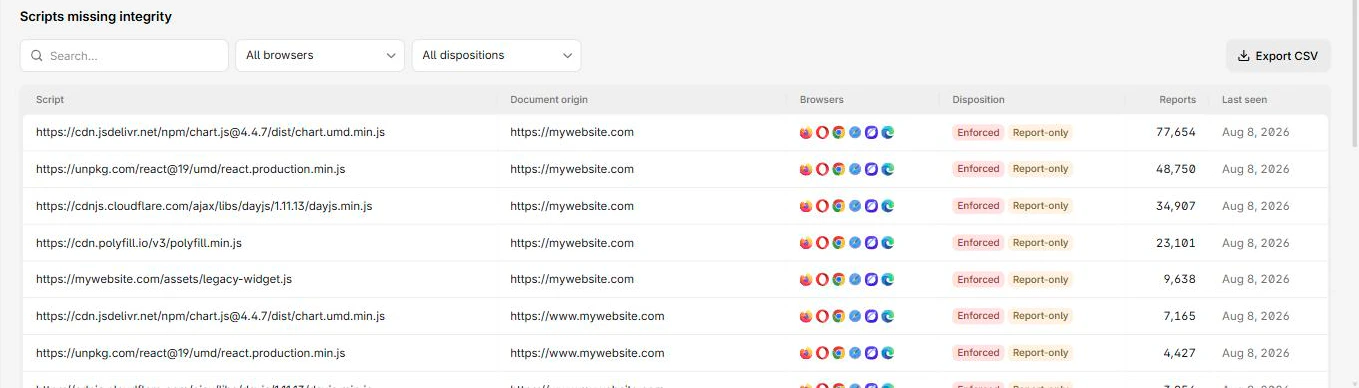
Turning on blocking before you know which scripts carry SRI will break the page: every legitimate but un-hashed script gets blocked along with the bad ones. Run the report-only variant first. It reports each script that lacks valid integrity without blocking anything, so you see the full list before you enforce.
Integrity-Policy-Report-Only: blocked-destinations=(script), endpoints=(integrity-endpoint)Leave that running until the reports stop surfacing scripts you have not yet hashed. Then add the integrity attribute (or drop the dependency) for everything on the list, and switch the header to Integrity-Policy to enforce.
What a violation report looks like
When a script loads without valid integrity, the browser emits an integrity-violation report to your endpoint. It names the page, the blocked script, and whether the policy was enforcing or only reporting.
{
  "type": "integrity-violation",
  "age": 5,
  "url": "https://api-next.centralcsp.com/",
  "user_agent": "Mozilla/5.0 ...",
  "body": {
    "documentURL": "https://api-next.centralcsp.com/",
    "blockedURL": "https://api-next.centralcsp.com/example-framework.js",
    "destination": "script",
    "reportOnly": false
  }
}
The reportOnly field tells you which mode produced the report: true for the report-only header, false once you enforce. The blockedURL is the script that was missing valid SRI, which is the line you act on.
The supply-chain case
This is where the header earns its place. Say you load an analytics script from a CDN with a correct integrity hash, and the CDN account is compromised so the file is swapped for a tampered version. SRI catches that one because the bytes no longer match the hash, and the script is blocked.
Now say a teammate adds a new third-party tag and forgets the integrity attribute. Per-element SRI cannot help, there is no hash to check against. Integrity-Policy does: the unhashed script violates the policy, so it is blocked and reported as an integrity-violation. The same report fires when a resource is requested in no-cors mode, where the browser cannot read the bytes to verify them at all. Both are the supply-chain gaps you want to know about before they run.
Integrity-Policy is the enforcement half. Knowing what is actually running on your pages is the other half. CentralCSP builds a script inventory from CSP hash reports, so you can see every script (and which ones lack integrity) before you flip the header to enforce. Start free to map your client-side scripts and collect integrity-violation reports in one place.