PCI DSS v4 client-side security explained for compliance owners
CentralCSP Team ·
Last update:
PCI DSS v4 added two requirements that live entirely in the customer's browser: 6.4.3 and 11.6.1. Both became mandatory on March 31, 2025, and both remain in the current standard, v4.0.1. They are about the scripts and the HTTP security headers on your payment pages, the place where a card-skimming attack actually steals data. If you own compliance rather than the codebase, the practical question is what these two requirements ask for, what an assessor will want to see as evidence, and what controls produce it. This post answers that in plain terms. For the developer-side view of building the Content Security Policy that backs this up, see CSP and PCI DSS v4.
Why the browser is now in scope
Older versions of PCI DSS focused on your servers and your network. Attackers moved. A skimmer no longer needs to breach your server; it changes a script that the customer's browser loads on the checkout page, and the card data is copied as the shopper types it. Your server logs never see it, because the theft happens in the browser, on its way to the attacker.
So PCI DSS v4 added requirements that point at the browser. The evidence for them has to come from what the browser actually loaded and ran, not from a scan of your source repository or your server config. That distinction decides which tools can satisfy these requirements at all.
6.4.3, manage and authorize payment-page scripts
Requirement 6.4.3 asks you to manage every script that loads on the payment page. In plain terms it has three parts:
- Inventory. Keep a list of every script that runs on the payment page.
- Authorize. Have a record that each script was reviewed and approved, with a written justification for why it is needed, before it runs.
- Assure integrity. Have a method to confirm each authorized script has not been altered.
The intent is simple to state: no script runs on your payment page that you did not knowingly approve. The hard part in practice is that you often do not have a complete list of what runs there, because tag managers and third-party scripts pull in further scripts at runtime.
11.6.1, detect tampering and unauthorized change
Requirement 11.6.1 asks you to deploy a change-and-tamper detection mechanism on the payment page. It must alert you to unauthorized modification of two things as received by the customer's browser: the HTTP security headers, and the contents of the scripts. It also sets a cadence: the mechanism evaluates the page at least once every seven days, or on a frequency you justify through your own risk analysis.
The intent again states simply: if an attacker changes a header or a script on your payment page, you find out quickly, and from the browser's vantage point rather than your own server's.
Read together, 6.4.3 is about knowing and approving what should be there, and 11.6.1 is about being told when something changes.
What an assessor wants to see
An assessor is checking that the control exists, that it runs, and that you act on what it produces. For these two requirements that usually means:
- A current inventory of payment-page scripts, each with a recorded business justification and an authorization record.
- Evidence of the integrity method for authorized scripts, for example the hashes or the policy that enforces them.
- Records showing the change-detection mechanism runs on the required cadence, and what it found.
- Alert records and the response to them, showing an unauthorized change would be caught and acted on.
- That the evidence reflects the page as the customer's browser receives it, not a server-side scan.
That is the kind of evidence an assessor expects for these two requirements. How your specific tooling produces each piece is something to line up with your own deployment and your assessor before you cite it.
How a script inventory and change detection supply it
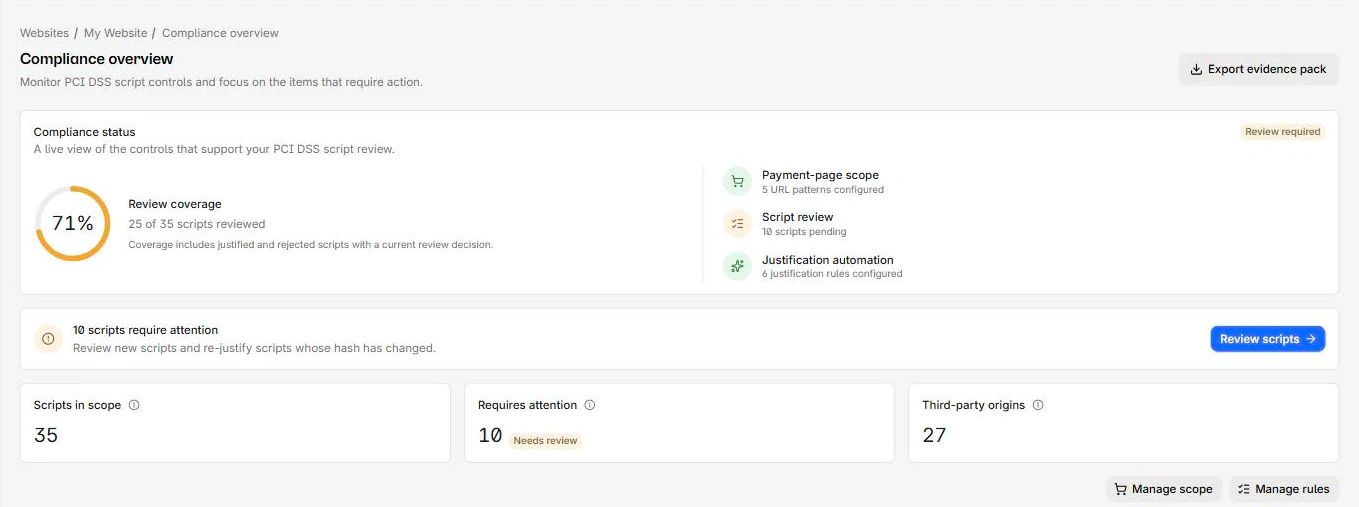
A script inventory built from browser reports lists every script that actually executed on the payment page, with the technology, version, and known vulnerabilities behind each one. Paired with a recorded justification per script, that is the inventoried-and-authorized list 6.4.3 asks for. The same approach catches the runtime-injected scripts that a source scan misses, including formjacking and Magecart skimmers that load only in the browser.
Change detection and alerting cover 11.6.1. When the set of scripts or the response headers on the page differ from the approved baseline, a new origin, a script that was not there before, or a modified security header, an alert fires. Because the signal comes from real browsers loading the page, it reflects what the customer received, which is exactly the vantage point the requirement names. The seven-day cadence is met by continuous monitoring rather than a manual weekly check.
If you run a tag manager, treat its tags as in-scope payment-page scripts. A tag manager can inject scripts, so each tag it loads is something you have to inventory, authorize, and monitor for change, and a compromised container is the precise scenario 11.6.1 is meant to catch.
What "helps you meet" means
CentralCSP gives you the controls and the records that satisfy the intent of 6.4.3 and 11.6.1: the script inventory and authorization list, the integrity assurance, the tamper detection through reporting and alerting, and exportable evidence for your assessment. What it does not do is certify your compliance. A Qualified Security Assessor (QSA), or your own self-assessment questionnaire where you are eligible, makes that determination. We never write "PCI certified" or "guaranteed compliant", because that decision is not ours to make.
One nuance worth stating plainly for a compliance owner: a tool that only scans your source repository or your server configuration does not satisfy 11.6.1, because it never sees what the customer's browser received. The evidence has to come from the browser side, which is what continuous client-side monitoring provides.
Next steps
- Read the developer-side view: CSP and PCI DSS v4.
- See how an inventory is built: building a script inventory from CSP reports.
- Understand a payment-page threat in scope: how attackers abuse Google Tag Manager.
- Get the standard itself from the source below.
Start monitoring your payment pages, point a report-only header from your checkout at it, and watch the inventory and change history build from real traffic.