CSP and PCI DSS v4, meeting 6.4.3 and 11.6.1 on payment pages
CentralCSP Team ·
Last update:
PCI DSS v4 added two requirements aimed squarely at the browser: 6.4.3 and 11.6.1. Both became mandatory on March 31, 2025, and both carry into the current standard, v4.0.1. Both are about the scripts and HTTP headers on your payment pages, the place a Magecart skimmer steals card data (what Magecart and formjacking are). A Content Security Policy (CSP), an HTTP response header that tells the browser which scripts may run, combined with a script inventory, change alerting, and violation reporting, gives you the management and tamper-detection evidence these requirements ask for. CentralCSP helps you meet 6.4.3 and 11.6.1 by producing that evidence; it does not certify compliance. Your QSA signs off.
This post explains what each requirement asks in plain terms and how the client-side controls map to it. If you own compliance rather than the code, read PCI DSS v4 client-side for the compliance owner instead. CentralCSP supplies the script inventory and the header and script change monitoring these requirements lean on for evidence; treat the exact feature-to-requirement mapping as something to line up with your assessor, not as a certification.
The two requirements in plain terms
Both requirements apply to the pages that handle payment-card data in the consumer's browser (the checkout and payment pages), and to scripts loaded and executed there.
6.4.3, manage and authorize payment-page scripts
Requirement 6.4.3 asks you to manage all scripts that load in the payment page. In practice that means three things: you keep an inventory of every script with a written justification for why it is needed, you authorize each script before it runs, and you have a method to assure the integrity of each script. The intent is that no script runs on your payment page that you did not knowingly approve.
11.6.1, detect tampering and unauthorized change
Requirement 11.6.1 asks you to deploy a change-and-tamper detection mechanism on the payment page that alerts you to unauthorized modification of the HTTP headers and the script contents as received by the consumer's browser. It also sets a cadence: the mechanism evaluates the page at least once every seven days, or on a frequency defined by your own risk analysis. The intent is that if an attacker changes a header or a script on the payment page, you find out quickly.
Read together, 6.4.3 is about knowing and authorizing what should be there, and 11.6.1 is about being told when something changes.
How a CSP and client-side monitoring map to them
These are browser-side requirements, so the evidence has to come from what the browser actually loads and runs, not from your server logs. That is what a CSP plus reporting gives you.
Knowing and authorizing the scripts (6.4.3)
A script inventory built from CSP hash reporting lists every script that executes on the payment page, with the technology, version, and known CVEs behind each one. That inventory, plus a recorded justification per script, is the authorized-and-inventoried list 6.4.3 asks for. A strict CSP is the enforcement side: a nonce plus 'strict-dynamic' policy means only scripts you marked run, which is the authorization mechanism in the browser, and CSP hashes or Subresource Integrity give you the integrity assurance for the scripts you do allow.
Detecting change and tampering (11.6.1)
Violation reporting and change alerting cover 11.6.1. Every time the browser blocks or reports a script or a changed resource on the payment page, that report flows to your collector. Change alerting fires when the set of scripts or the response headers on the page differ from the approved baseline: a new origin, a new inline block, a script that was not there before, or a modified security header. Because the reports come from real browsers loading the page, they reflect the page as the consumer receives it, which is exactly the vantage point 11.6.1 names.
A short example of the policy and reporting wiring on a payment page:
Content-Security-Policy:
  script-src 'self' 'nonce-{SERVER-GENERATED-NONCE}' 'strict-dynamic';
  object-src 'none';
  base-uri 'none';
report-to csp-endpointReporting-Endpoints: csp-endpoint="https://<Endpoint-ID>.report.centralcsp.com"Building that policy safely is its own workflow; see how to build a strong CSP for the Report-Only-first approach.
What "helps you meet" means here
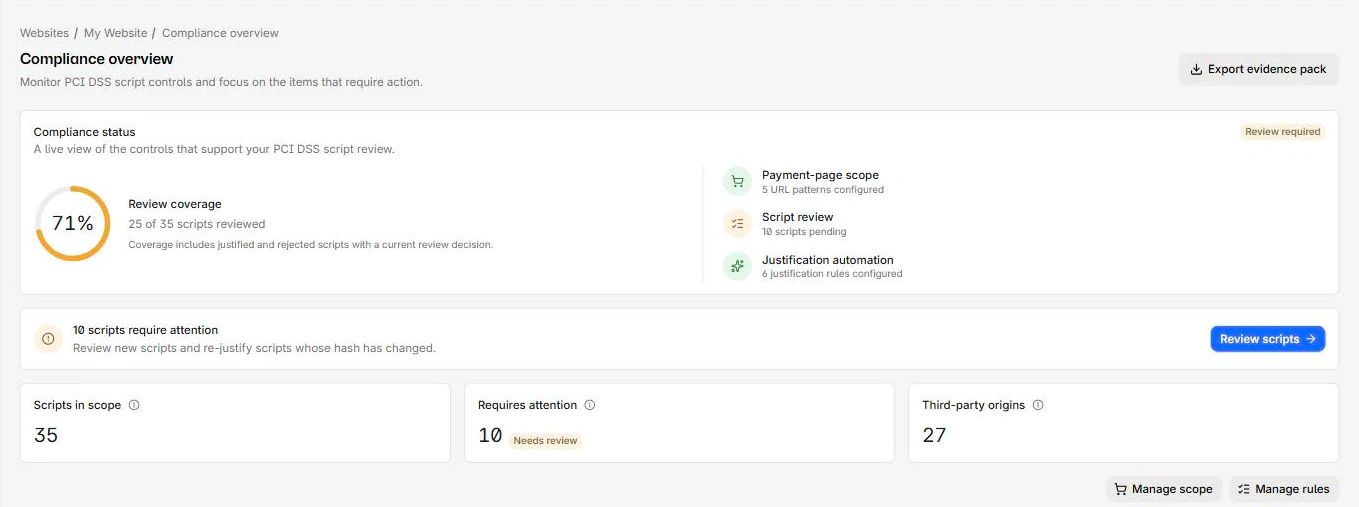
CentralCSP gives you the controls and the records that satisfy the intent of 6.4.3 and 11.6.1: the script inventory and authorization list, the integrity assurance through CSP and hashes, the tamper detection through reporting and alerting, and exportable evidence for your assessment. What it does not do is certify your compliance. A Qualified Security Assessor, or your own SAQ where eligible, makes that determination. We never write "PCI certified" or "guaranteed compliant", because that decision is not ours to make. The exact mapping of each feature to each requirement sub-point is something to confirm against your own deployment and with your assessor before you cite it.
One nuance worth stating plainly: these requirements concern your payment-page scripts and headers as the browser sees them. A tool that only scans your source repo or your server config does not satisfy 11.6.1, because it does not see what the consumer's browser received. The evidence has to come from the browser side.
Where Google Tag Manager fits
If you load Google Tag Manager on your payment page, it is in scope for both requirements: GTM can inject scripts, so every tag it loads is a payment-page script you have to inventory, authorize, and monitor for change. A compromised container is the precise scenario 11.6.1 is meant to catch. Treat GTM tags as in-scope scripts, not as an exception.
Put it together
CentralCSP ingests your payment-page CSP violation and hash reports, builds the script inventory, alerts on changes to scripts and headers, and exports the evidence your assessor needs, which is the monitoring side of 6.4.3 and 11.6.1. You can start a free trial, point a Report-Only header from your checkout pages at it, and watch the inventory and reports build from real traffic before you enforce.
Frequently asked questions
What does PCI DSS 6.4.3 require?
That you manage the scripts on your payment page: keep an inventory with a written justification for each, authorize each script before it runs, and have a method to assure each script's integrity. The goal is that no unapproved script runs on the payment page.
What does PCI DSS 11.6.1 require?
A change-and-tamper detection mechanism on the payment page that alerts you to unauthorized modification of the HTTP security headers and script contents as received by the consumer's browser, evaluated at least every seven days or on a frequency set by your risk analysis.
Does a CSP satisfy PCI DSS v4 on its own?
Not by itself. A CSP enforces which scripts run and supports integrity, which helps with 6.4.3. Meeting both requirements also needs an inventory with justifications, change detection, and alerting on the payment page, plus the records to show your assessor. The browser-side reporting is what makes the evidence reflect what the consumer received.
Does CentralCSP certify PCI DSS compliance?
No. CentralCSP helps you meet the client-side requirements (6.4.3 and 11.6.1) by providing the monitoring, alerting, and exportable evidence. A QSA, or your SAQ where eligible, signs off on compliance.
The takeaway
PCI DSS v4 6.4.3 and 11.6.1 are browser-side requirements: know and authorize your payment-page scripts, and detect when a script or header changes. A strict CSP enforces authorization and supports integrity, a script inventory gives you the authorized list, and violation reporting with change alerting gives you the tamper detection, all from what the consumer's browser actually loaded. That set of controls and records is how you meet the requirements; your assessor signs off.
Further reading: the PCI Security Standards Council document library for the standard and supporting guidance.
Sources
- PCI Security Standards Council, document library
- W3C, Content Security Policy Level 3
- MDN, Content Security Policy guide