How to build a strong CSP, step by step
CentralCSP Team ·
Last update:
A Content Security Policy (CSP) is an HTTP response header that tells the browser which scripts, styles, and other resources a page is allowed to load and run. A strong one is the most effective in-browser defense you have against cross-site scripting (XSS) and script-based data theft. The hard part is not the syntax. It is building a policy that locks the page down without breaking it.
The reliable way to get there is to measure first and enforce last. You start with a strict policy in report-only mode, watch what real traffic would have violated, build the real policy from that evidence, validate it, then turn on enforcement and keep monitoring. This post walks that workflow end to end, with the exact starter header and the per-framework setup.
New to CSP? Start with get started with Content Security Policy for the basics, what CSP is, your first policy, and your first nonce, then come back here for the full build.
The workflow in one minute
Here is the whole process before the detail:
- Start in Report-Only. Ship a deliberately strict policy on the
Content-Security-Policy-Report-Onlyheader. The browser blocks nothing and reports everything it would have blocked. - Set the header on your server or framework. Use the right mechanism for your stack so the header reaches every response.
- Collect violation reports from real traffic. Point the policy at a reporting endpoint and let live users generate the data.
- Build the real policy from what you see. Each report tells you an origin or inline resource your page actually needs. Add the minimum to allow it.
- Validate. Score the policy, confirm it has no obvious bypasses, and check it is genuinely strict.
- Enforce. Move the validated policy from
Content-Security-Policy-Report-OnlytoContent-Security-Policy. - Keep monitoring. New code and third parties change what the page loads. Keep reports flowing so you catch breakage and tampering.
The same seven steps as a flow:
The principle behind every step: never enforce a policy you have not measured against real traffic. Report-Only is what makes that safe.
Step 1: start with a strict Report-Only policy
Begin with a policy that is too strict on purpose. In report-only mode the browser enforces nothing, so an overly tight policy costs you nothing but a stream of reports that tell you exactly what the page depends on. That is the data you want.
Send this on the Content-Security-Policy-Report-Only header as your starting point:
Content-Security-Policy-Report-Only:
  default-src 'self';
  script-src 'self' 'report-sample';
  style-src 'self';
  img-src 'self';
  font-src 'self';
  object-src 'none';
  base-uri 'none';
  form-action 'none';
  frame-ancestors 'none';
  frame-src 'self';
  connect-src 'none';
  upgrade-insecure-requests;
  report-uri https://<Endpoint-ID>.report.centralcsp.com;
  report-to csp-endpoint
What each part is doing:
default-src 'self'is the fallback for any fetch directive you do not name, so anything not listed defaults to same-origin only.script-src 'self' 'report-sample'allows same-origin scripts.'report-sample'tells the browser to include a short sample, the first 40 characters, of any offending inline code in the report, which makes violations far easier to identify. It is accepted inscript-src,style-src, and their-elemand-attrvariants.object-src 'none'blocks plugins.base-uri 'none'blocks an injected<base>tag, which could otherwise hijack relative URLs and defeat a nonce-based policy.form-action 'none'blocks where forms can submit.frame-ancestors 'none'is anti-clickjacking and the modern replacement forX-Frame-Options; if you cannot set a CSP header at all, see clickjacking protection when you cannot set a CSP header.frame-src 'self'limits what the page can frame.upgrade-insecure-requestsupgrades insecure subresource requests to HTTPS before they reach the network, with no HTTP fallback. It takes no value. It does not upgrade cross-origin top-level navigations and it does not replace HSTS; see HSTS vs upgrade-insecure-requests for how the two differ.report-uriandreport-tosend the violation reports to your collector. More on those two in step 3.
Two footguns this policy is designed to surface
This starter is intentionally not safe to enforce as-is. Two directives will report heavily, and that is the point.
connect-src 'none' blocks every fetch, XMLHttpRequest, WebSocket, and EventSource request. It will break almost any real site the moment you enforce it. Starting at 'none' forces every network call your page makes to show up as a report, so you can see them all. Nearly every app ends up needing at least connect-src 'self' plus its API and analytics origins.
style-src 'self' will report on inline styles, which frameworks like Angular and CSS-in-JS libraries inject constantly. You handle those with a style nonce rather than by opening the policy with 'unsafe-inline'.
The starter policy is a measurement instrument, not your final policy. Expect a lot of reports on day one. That is the workflow doing its job.
Step 2: set the CSP header on your server or framework
A policy only works if the header reaches the browser on every response, including error pages. Use the mechanism built for your stack. Each example below sets an enforcing or report-only CSP header; swap the header name and directives for the starter policy from step 1. For more stacks and full snippets, see how to set the CSP header in every framework.
Nginx
With the ngx_http_headers_module, use add_header with always so the header is sent on error responses too:
add_header Content-Security-Policy "default-src 'self'" always;Apache
With mod_headers:
Header always set Content-Security-Policy "default-src 'self'"Traefik
With the headers middleware, set a custom response header:
traefik.http.middlewares.csp.headers.customresponseheaders.Content-Security-Policy=default-src 'self'Express (Helmet)
Helmet sets the header for you, and supports report-only mode directly. Directive values can be functions, which is how you supply a fresh per-request nonce:
app.use(
  helmet({
    contentSecurityPolicy: {
      directives: { "script-src": ["'self'"] },
      reportOnly: true,
    },
  })
);
Django (django-csp)
Add csp.middleware.CSPMiddleware, then set the policy in settings. Use CONTENT_SECURITY_POLICY_REPORT_ONLY for the report-only phase and CONTENT_SECURITY_POLICY once you enforce:
CONTENT_SECURITY_POLICY_REPORT_ONLY = {
    "DIRECTIVES": {
        "default-src": ["'self'"],
        "script-src": ["'self'", "'report-sample'"],
    },
}
Next.js (App Router)
For a strict nonce policy with dynamic rendering, generate a per-request nonce in proxy.ts and emit script-src 'self' 'nonce-...' 'strict-dynamic'. The 'strict-dynamic' keyword is what lets trusted scripts load further scripts without a host allowlist. For a static policy, return the header from async headers() in next.config.js. The proxy route is what lets you ship a real nonce; for the full setup see how to set up a CSP nonce in Next.js.
Nuxt (nuxt-security)
Configure security.headers.contentSecurityPolicy in nuxt.config.ts. Its default is already a strict nonce plus 'strict-dynamic' policy, so you are tightening from a good baseline rather than building from scratch.
Laravel (spatie/laravel-csp)
Register the Spatie\Csp\AddCspHeaders::class middleware, then define your policy through presets in config/csp.php. The package ships report-only presets for the collection phase.
Angular
Angular does not set the header itself; your server does that with one of the mechanisms above. What Angular gives you is a per-request nonce, supplied through the CSP_NONCE token or the ngCspNonce attribute. Pair it with a server-set script-src 'self' 'nonce-...'.
Step 3: collect violation reports from real traffic
The starter policy already points at a reporting endpoint. Real users on real pages now generate the evidence you build the policy from. Synthetic testing misses the long tail of third-party scripts, regional analytics, and edge-case pages, so collect from live traffic.
Send the reports to your collector
Use the report-to directive with the Reporting-Endpoints response header, which names your collector. report-uri is its deprecated predecessor; you can still send it on the same policy, pointing at the same collector. The differences are in report-uri vs report-to.
Reporting-Endpoints: csp-endpoint="https://<Endpoint-ID>.report.centralcsp.com"Content-Security-Policy-Report-Only:
default-src 'self';
script-src 'self' 'report-sample';
...
report-uri https://<Endpoint-ID>.report.centralcsp.com;
report-to csp-endpointRead the reports, do not drown in them
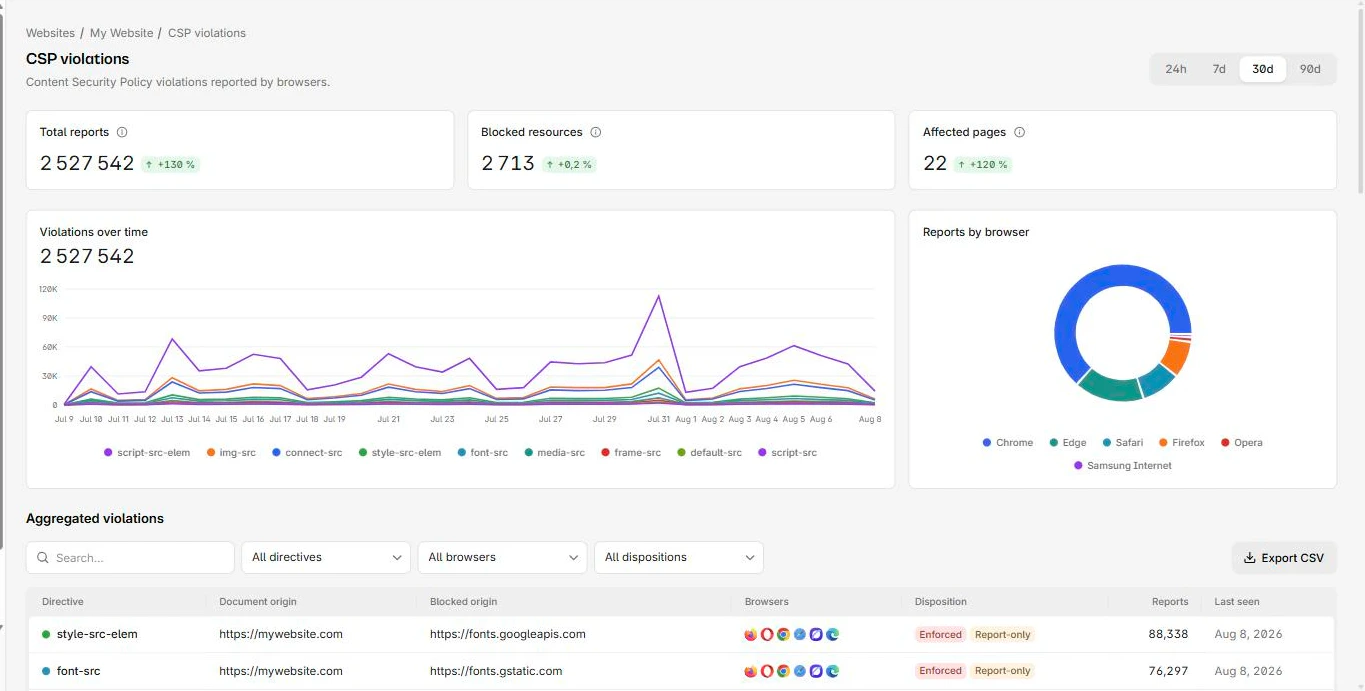
Raw CSP report JSON arrives one violation at a time and quickly becomes thousands of near-duplicate records. The work is grouping them: which distinct origins and inline resources does the page actually need, and which look like noise or an injection attempt.
This is the part CentralCSP is built for. It ingests your Report-Only violation reports, groups them by directive and origin, and shows the scripts running on each page through CSP hash reporting, so you can see exactly what to allow before you enforce. You can start a free trial, point a Report-Only header at it, and watch the reports come in from real traffic. If you would rather audit an existing policy first, the CSP scanner checks what a live site already sends.
Step 4: build the real policy from what you see
Now turn the grouped reports into a policy. Work directive by directive, and for each report decide one of three things: the resource is legitimate and you allow it with the narrowest source possible, it is something you can remove or self-host, or it is suspicious and you investigate it.
A few rules of thumb as you build:
- Add specific origins, not wildcards. If reports show
connect-srccalls to your API and one analytics host, list those two origins, nothttps:. - Self-host what you reasonably can. Fewer third-party origins means a smaller policy and a smaller supply-chain surface.
- For inline scripts and styles you genuinely need, use a nonce or a hash, never
'unsafe-inline'. The starter's'report-sample'keyword and the script inventory tell you which inline blocks are yours.
Make script-src genuinely strong
This is the step that separates an average policy from a strong one, and it applies to the enforced policy, not the day-one starter.
Host allowlists in script-src are weak. Any open redirect or JSONP endpoint on an allowed host can become a bypass. The strong pattern is to drop host allowlists for scripts and trust nonces or hashes plus 'strict-dynamic':
Content-Security-Policy: script-src 'self' 'nonce-r4nd0m' 'strict-dynamic'; object-src 'none'; base-uri 'none''strict-dynamic' tells the browser to ignore host allowlists, 'self', and 'unsafe-inline' for scripts, and to trust only nonce-marked or hash-marked scripts and the scripts those load. It is the modern way to allowlist scripts without fragile host lists.
Whatever you do, do not lean on 'unsafe-inline' to make script errors go away. It re-enables exactly the inline execution CSP exists to block. The full reasoning is in why you should never use 'unsafe-inline' in CSP, and the same goes for its sibling: see unsafe-eval and how to remove it.
Third-party tag managers are the common case where this matters. For running GA4 and Google Tag Manager under a nonce plus 'strict-dynamic' without listing Google hosts in script-src, see CSP with Google Analytics and Tag Manager.
For the complete list of directives, values, and keywords as you assemble the policy, see the CSP policy reference.
Step 5: validate the policy
Before you enforce, confirm the policy is both strict and free of obvious bypasses. A policy can be syntactically valid and still be effectively useless, for example a script-src that falls back to 'unsafe-inline' or allows a host known to host arbitrary scripts.
Run it through the CSP evaluator to score the new policy and flag weak sources, missing object-src, a wildcard that defeats the point, or a missing base-uri. Fix what it surfaces, then re-check. This is also the moment to confirm you did not accidentally widen a directive while chasing reports in step 4.
Step 6: enforce
When the Report-Only stream is quiet, meaning the only violations left are noise or genuine attempts you are happy to block, promote the policy. Move the exact same directives from the Content-Security-Policy-Report-Only header to the enforcing Content-Security-Policy header.
Keep a report-uri and report-to on the enforcing header too. Enforcement and reporting are not mutually exclusive: an enforcing policy still sends a report for every resource it blocks, which is how you find out when enforcement breaks something you missed.
A common and safer pattern is to run both headers at once for a while: the validated policy enforcing, and an even stricter candidate in Report-Only, so you can keep tightening without risk.
Step 7: keep monitoring
A CSP is not a set-and-forget header. Every new feature, dependency bump, or third-party tag can introduce an origin or inline block your policy does not allow, which either breaks the page or, worse, signals that something changed on the page without your knowing.
Keep the reports flowing in production. Two things to watch for:
- Breakage: a new legitimate resource your policy blocks. The report tells you what to add.
- Tampering: scripts or origins appearing that no one on your team introduced. On a payment page, that is the early signal of formjacking or a Magecart-style skimmer.
Ongoing CSP report monitoring, script inventory with CVE detection, and alerting on new or changed scripts are the core of the CentralCSP CSP suite. For payment pages specifically, continuous script monitoring is how the platform helps you meet the PCI DSS v4 client-side requirements (6.4.3 and 11.6.1); see CSP for PCI DSS v4 for how the policy and the requirements line up. It does not certify compliance; it gives you the monitoring and exportable evidence, and your QSA signs off.
Frequently asked questions
How long should I run CSP in Report-Only?
Long enough to see real traffic across your pages and third parties, commonly one to two weeks. Stop when the only violations left are noise or genuine attempts you are happy to block.
What is a good starter CSP?
A deliberately strict Report-Only policy: default-src 'self', object-src 'none', base-uri 'none', frame-ancestors 'none', and a script-src you tighten to nonces. Use the starter header above and let the reports guide you.
Should I use report-uri or report-to?
Use report-to with the Reporting-Endpoints header; that is the current mechanism. report-uri is the deprecated predecessor, which you can still include on the same policy if you want.
What makes script-src strong?
Nonces or hashes plus 'strict-dynamic', instead of host allowlists. That way an open redirect or JSONP endpoint on an allowed host cannot become a script-injection bypass.
A quick recap of the order
The strength of a CSP comes from the sequence, not from any single directive:
- Strict policy in Report-Only first, so measurement is free.
- Collect from real traffic, because synthetic testing misses the long tail.
- Build narrowly, one report at a time, with nonces and
'strict-dynamic'for scripts. - Validate, enforce, and keep monitoring, because the page keeps changing.
A note on building the policy itself: a guided CSP Builder that turns your collected reports into a ready-to-ship policy is coming, with its own how-to. Until then, this workflow gets you a strong policy by hand.
Further reading: the MDN guide to CSP and the W3C CSP Level 3 specification.