Get started with CSP reporting
CentralCSP Team ·
Last update:
A Content Security Policy (CSP) is only as good as what you learn from it. Reporting
is how the browser tells you which resources your policy would block, on real pages,
in real browsers you do not own. This guide sets up reporting the modern way, clears
up the confusing tangle of report-uri, report-to, and the reporting headers, and
shows you what a violation report actually looks like.
The short version: send the Reporting-Endpoints
header, point the report-to
directive at it, and start in report-only
so nothing breaks while you learn.
Why turn on reporting
You cannot reproduce every browser, extension, and device your visitors use. A policy that looks clean in your own browser can still block a legitimate script for someone on a different setup. Reporting is your early warning system: the browser sends a small JSON report every time the policy blocks something, so you see real violations before they become support tickets.
Two directives, two headers (the part everyone confuses)
There are two CSP directives (they go inside the policy) and two reporting headers (separate response headers that name an endpoint). The directives say "report here"; the headers define what "here" means.
Directives, inside Content-Security-Policy or Content-Security-Policy-Report-Only:
report-uri <url>: takes a URL directly. Deprecated, but still useful as a fallback.report-to <name>: takes a single name, not a URL. The name is defined by a reporting header. This is the current directive.
Reporting headers, which define the named endpoint that report-to points at:
Reporting-Endpoints: the current standard (Reporting API v1). Syntax isname="https://...".Report-To: the deprecated v0 header. You do not need it for a new setup.
This is where the old advice goes wrong. The Report-To header is the deprecated
thing; the report-to directive is current. They are not the same. For anything
new, define your endpoint with Reporting-Endpoints and reference it from the
report-to directive. For the header-level history, see Report-To vs Reporting-Endpoints; for the two directives, see report-uri vs report-to.
The modern setup, in report-only
Send two response headers. The endpoint name (csp-endpoint here) is yours to choose;
it just has to match in both places. Point it at your CentralCSP endpoint and keep the
policy in report-only at first, so the browser reports violations without blocking
anything:
Reporting-Endpoints: csp-endpoint="https://<Endpoint-ID>.report.centralcsp.com"Content-Security-Policy-Report-Only:
default-src 'self';
script-src 'self';
style-src 'self';
img-src 'self';
object-src 'none';
base-uri 'none';
report-to csp-endpointThe endpoint must be served over HTTPS. The Reporting API ignores non-secure
endpoints, and the endpoint does not need to be on your own origin, so pointing it at
<Endpoint-ID>.report.centralcsp.com is exactly the intended pattern.
Keep report-uri as a fallback (optional)
Browsers that support report-to ignore report-uri, so adding both does not produce
duplicate reports. The only thing report-uri buys you is coverage for older clients
that do not support the newer directive. If you want that belt-and-suspenders fallback,
list both in the same policy:
Content-Security-Policy-Report-Only:
  default-src 'self';
  report-uri https://<Endpoint-ID>.report.centralcsp.com;
  report-to csp-endpoint
Note that report-uri only works in a real response header, never in a <meta> tag.
What a violation report looks like
There are two payload shapes, and they use different field names. Do not mix them up. For a field-by-field walkthrough, see the CSP violation report fields reference.
The legacy report-uri shape is a single object wrapping csp-report, with hyphenated
field names, posted as application/csp-report:
{
  "csp-report": {
    "document-uri": "https://api-next.centralcsp.com/signup",
    "violated-directive": "script-src-elem",
    "effective-directive": "script-src-elem",
    "blocked-uri": "https://apis.google.com/js/platform.js",
    "disposition": "report",
    "status-code": 200,
    "script-sample": ""
  }
}
The Reporting API shape (report-to) is a JSON array of reports, posted as
application/reports+json, with camelCase body fields:
[
  {
    "type": "csp-violation",
    "age": 53531,
    "url": "https://api-next.centralcsp.com/signup",
    "user_agent": "Mozilla/5.0 ...",
    "body": {
      "documentURL": "https://api-next.centralcsp.com/signup",
      "blockedURL": "https://apis.google.com/js/platform.js",
      "effectiveDirective": "script-src-elem",
      "originalPolicy": "default-src 'self'; report-to csp-endpoint",
      "disposition": "report",
      "statusCode": 200,
      "sample": ""
    }
  }
]
The disposition is report while you are in report-only and enforce once the
policy is enforced. The sample field (a short snippet of the offending code) only
appears when you add the 'report-sample' keyword to the directive. CentralCSP ingests
both shapes, so you do not have to normalize them yourself.
See and act on your reports
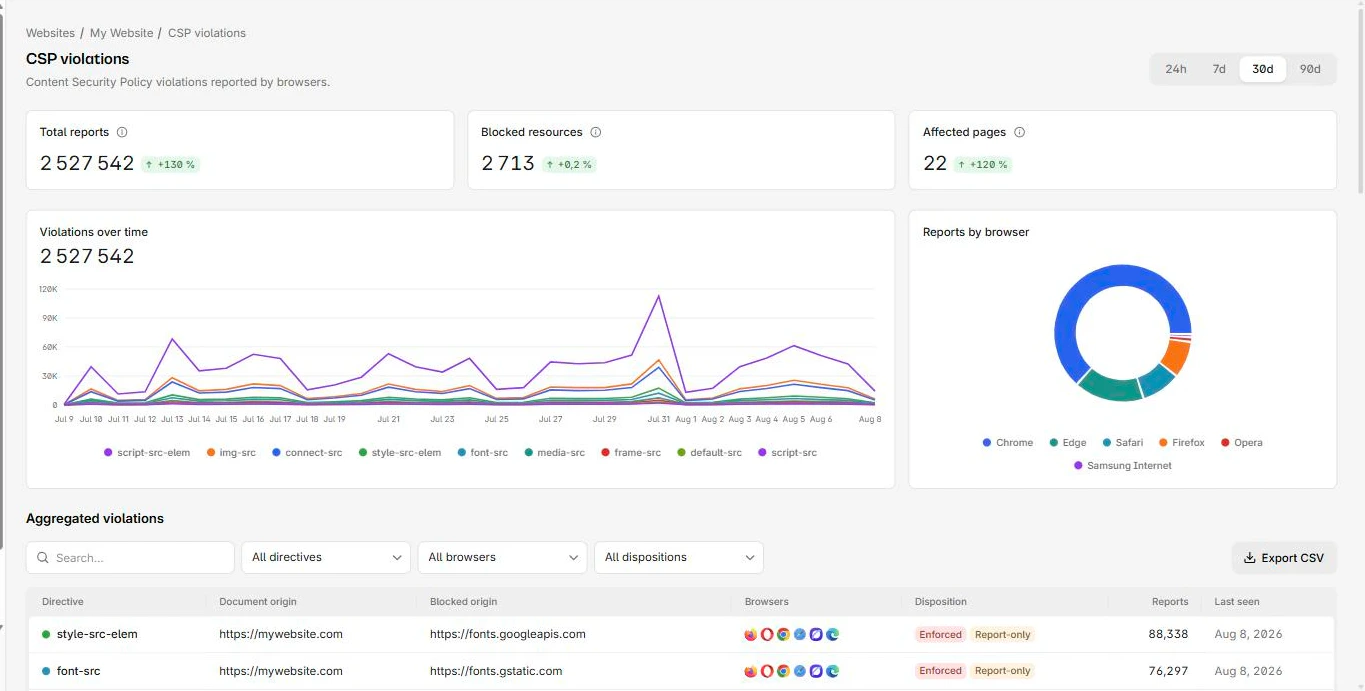
The endpoint is the part that does the work, so it helps to understand where browser reports go and how to receive them. Pointing the endpoint at CentralCSP gives you the reports in one place: which origins are blocked, how often, and on which pages, so you can tell a real problem from a harmless one and tighten the policy with confidence. From there you move from report-only to enforced once the noise is gone. The CSP suite handles the collection and analysis, and the free CSP scanner checks what you have shipped.
Next steps
- New to policies entirely? Start with get started with Content Security Policy.
- Building a full policy? See how to build a strong CSP.
- Ready to collect reports? Create a free account and get your endpoint.