How CSP report-sha keywords reveal every script that loads
CentralCSP Team ·
Last update:
You can ask the browser to tell you the cryptographic hash of every script that loads on a page. The Content Security Policy (CSP) keywords 'report-sha256', 'report-sha384', and 'report-sha512' do exactly that: add one to a script directive, point the policy at a reporting endpoint, and each script load produces a report carrying the script's digest. No script is blocked. You get a precise, ongoing record of what runs client-side, which is the raw material for a script inventory.
This is a recent, Chromium-led addition (Chrome and other Chromium browsers), with WebKit work in progress and no Firefox support yet. It is not on MDN at the time of writing, so treat it as an emerging feature, not a stable cross-browser one.
What the report-sha keywords do
The keywords are source values you place inside a script directive such as script-src or script-src-elem, alongside the other CSP keywords you already use:
'report-sha256'reports each script with a SHA-256 digest'report-sha384'reports each script with a SHA-384 digest'report-sha512'reports each script with a SHA-512 digest
They do not allow or block anything. A digest in a report is observability only, separate from the enforcing hash sources (the 'sha256-...' form) you use to permit a specific inline or external script; see how to generate a CSP hash for producing those. When one of these report-sha keywords is present and a script-like resource is fetched, the browser computes the digest of the response and sends a report to the policy's endpoint.
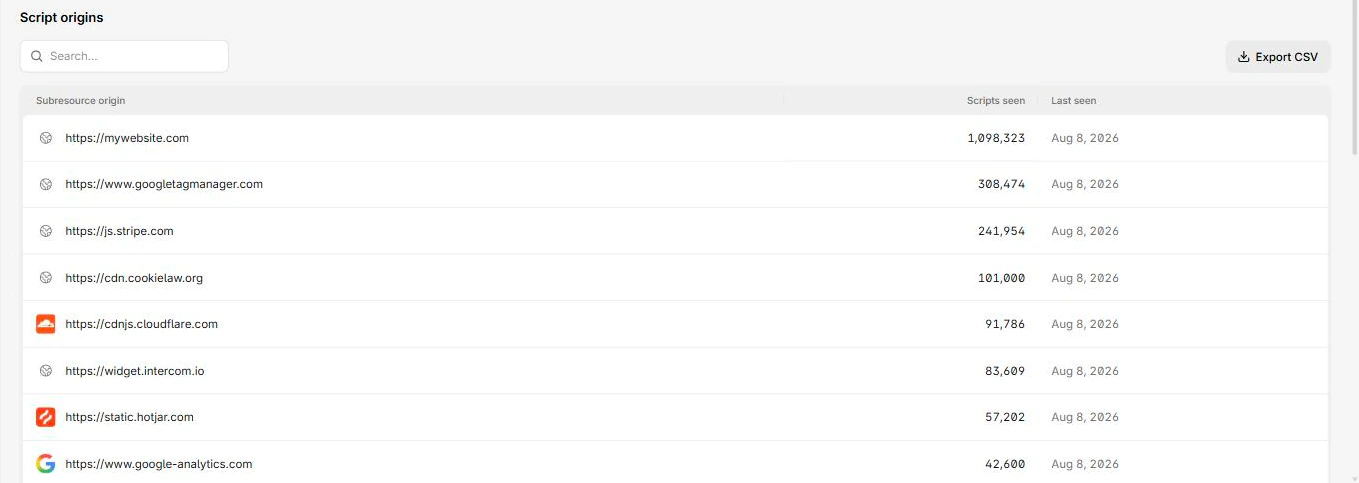
The point is inventory. CSP usually tells you what got blocked. These keywords tell you what loaded, with a digest you can match against known files, so a backend can build a script inventory or software bill of materials (SBOM) and notice when a script changes.
Set it up
Reporting goes through the report-to directive, which names a group declared in the Reporting-Endpoints header. The older report-uri directive is not used by this feature, and the difference between report-uri and report-to covers why. If you have not wired up reporting yet, walk through how to set up the browser Reporting API first.
Here is the minimal working setup. Declare an endpoint group, then add the keyword and point the policy at the group:
Reporting-Endpoints: hashes-endpoint="https://<Endpoint-ID>.report.centralcsp.com"Content-Security-Policy: script-src 'self' 'report-sha256';
report-to hashes-endpointThe endpoint must be HTTPS. Like every Reporting API endpoint, a non-secure URL is ignored.
To collect digests without any risk of breaking the page, start in report-only mode with the Content-Security-Policy-Report-Only header. You gather the real script inventory first, then tighten the enforcing policy once you know what loads. The same staged approach is covered in how to build a strong CSP and getting started with CSP reporting.
What the report looks like
Reports arrive in the standard Reporting API envelope: a JSON array sent with Content-Type: application/reports+json. The outer report type for this feature is "csp-hash".
The report body carries the script's identity and digest. Based on the CSP Level 3 spec, the body has these fields:
{
  "documentURL": "https://mywebsite.com/",
  "subresourceURL": "https://mywebsite.com/my_script.js",
  "hash": "sha256-r2hRGID3tnFVlAI+bMCPMjaKx/ovuqgaMic09dPqVCw=",
  "destination": "script",
  "type": "subresource"
}
Two type values sit at different levels, so keep them apart. The outer Reporting API report type is "csp-hash". The inner body has its own type, shown as "subresource" in the spec example. The hash field is formatted as <algorithm>-<base64>, the same shape you would use as a hash source in a policy.
Chromium emits the body in camelCase exactly as shown above (documentURL, subresourceURL, hash, type, destination), wrapped in the standard Reporting API envelope that adds type, url, user_agent, and age around it. The CSP Level 3 spec example serializes the body in snake_case (document_url, subresource_url), but the shipped Chromium form is camelCase.
Behavior and gotchas
A few things are worth knowing before you rely on it.
- Endpoint only, not in-page.
csp-hashreports are not delivered to an in-pageReportingObserver; they go only to your server endpoint. This differs from regular CSP violation reports, which Chromium does route to aReportingObserver. - Report-only behavior. The report-sha keywords collect hashes for reporting regardless of whether the surrounding policy is enforced or report-only, since the algorithm does not gate on enforcement.
- Cross-origin scripts need CORS. For a script loaded from another origin, the browser can compute and include the digest only when the request was made in CORS mode. Add
crossorigin="anonymous"to the tag so the browser can read the response body. Without it, the hash for that external script may be missing.
<script
  src="https://cdn.example.com/app.js"
crossorigin="anonymous"></script>- Combining algorithms. Whether all three keywords can be set at once to get multiple digests per script, and how a report-sha keyword interacts with an enforcing hash source in the same directive, is not spelled out in the spec, so test it in your own setup before relying on it.
Do not confuse these reporting keywords with the separate 'url-sha256-...' and 'eval-sha256-...' enforcement keywords. Those allow or block scripts by URL or eval digest. The report-sha keywords only report.
Why this matters for a script inventory
Once the browser reports a digest for every script that loads, a backend can do the work that raw violation counts never could: list each script that ran, match digests and URLs against known files and versions, and flag a change the moment a digest you have not seen before appears.
That is the basis of CentralCSP's script inventory. We ingest these csp-hash reports, build the inventory of what runs on each page, correlate scripts against CVE data, and alert when an unexpected script or hash shows up. For payment pages, that same script-change visibility maps directly to PCI DSS v4 requirements 6.4.3 and 11.6.1, where the platform helps you meet the client-side script-management and tamper-detection controls (your QSA signs off, not us).
If you want the digests collected and turned into an inventory without standing up your own pipeline, start free and point your Reporting-Endpoints header at your CentralCSP endpoint.
Quick recap
Add a report-sha keyword to a script directive, declare a Reporting-Endpoints group, and reference it with report-to. The browser sends a csp-hash report carrying each script's digest, nothing is blocked, and you get the per-script visibility that drives a script inventory. It is Chromium-first today, so plan for partial browser coverage and gather digests in report-only mode before you lean on them.