How to set up the browser Reporting API
CentralCSP Team ·
Last update:
The browser already knows when your security policies fire, when network requests
fail, and when a page uses an API that is about to be removed. Most of the time that
knowledge stays in the user's browser and you never see it. The Reporting API is how
you get it out: a small amount of configuration tells the browser to package those
events as JSON and send them to a server you control. This walkthrough takes you
from nothing to a working endpoint that receives real reports, the modern way, with
Reporting-Endpoints first and the deprecated Report-To only where you still need
it.
The short version: declare an endpoint with one header, name it from a policy, and the browser batches and delivers JSON reports to your URL out of band. The rest of this guide is the detail behind those three steps, and how to read what arrives.
What the Reporting API actually does
It helps to separate two things. A policy or platform feature is the producer: Content Security Policy (CSP), Cross-Origin-Opener-Policy (COOP), Network Error Logging, a deprecation warning, a crash. The Reporting API is the transport: a shared queue in the browser that collects those reports and delivers them. The producer decides what is worth reporting; the API decides how it travels.
When a producer flags an event, the browser does not send it immediately. It collects the report, batches it with others, and POSTs the batch to your endpoint on its own schedule, independent of the page. That decoupling is the point: a report can still arrive after the page has navigated away or even crashed, because delivery does not depend on the page being alive.
One caveat to set expectations: the spec calls delivery best-effort, not a guaranteed channel. Reports can be dropped, deduplicated, or delayed, so treat the stream as a high-value signal, not an audit log you can prove is complete. For the full model, see how the Reporting API works.
Step 1, declare a reporting endpoint
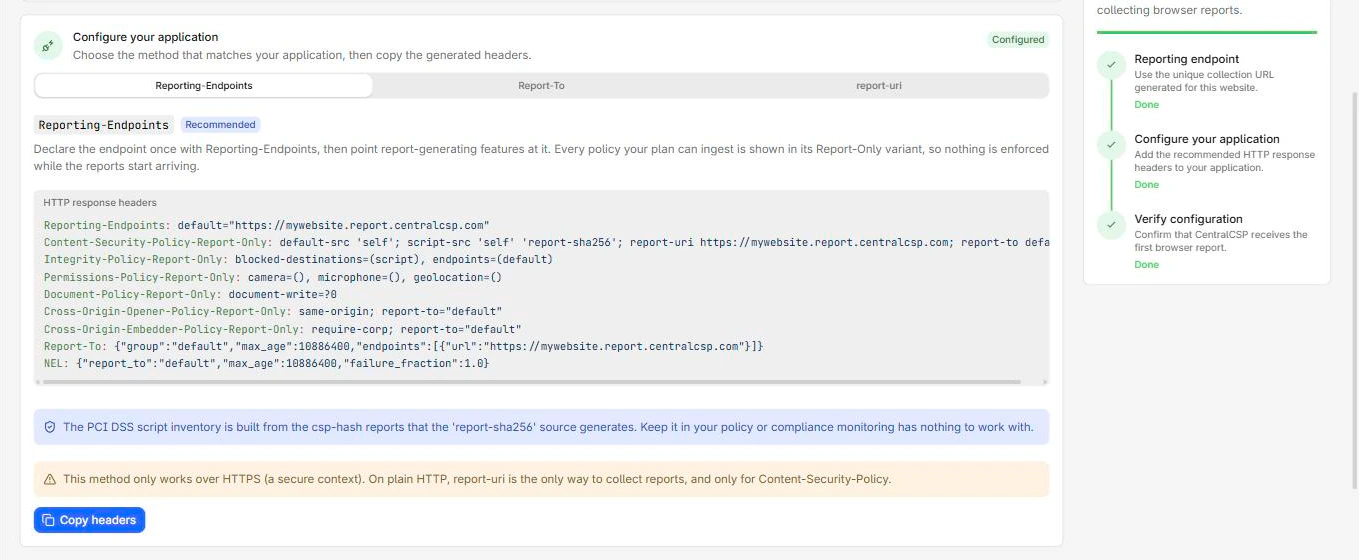
Everything starts with one response header. Reporting-Endpoints is a list of
named endpoints, each a name mapped to an HTTPS URL.
Reporting-Endpoints: main-endpoint="https://<Endpoint-ID>.report.centralcsp.com"Two rules matter here. The URL must be HTTPS, because the browser silently ignores a
non-secure endpoint, so a typo or an http:// URL means reports vanish with no
error. And the header only affects the response it is served on, so you must send it
on every page that should be able to report, not just the home page.
You can declare more than one endpoint and route different policies to different
URLs, and you can declare a special endpoint named default that catches report
types which have nowhere else to go (deprecations and interventions, crashes).
Reporting-Endpoints: default="https://<Endpoint-ID>.report.centralcsp.com",
                     csp-endpoint="https://<Endpoint-ID>.report.centralcsp.com"
Full syntax is on the Reporting-Endpoints reference.
Step 2, point a policy at the endpoint
Declaring an endpoint does nothing on its own. A policy has to reference it by name.
For CSP, that is the report-to directive. Start in Report-Only so a mistake in the
policy reports instead of blocking, and cannot break the page while you tune it.
Reporting-Endpoints: main-endpoint="https://<Endpoint-ID>.report.centralcsp.com"Content-Security-Policy-Report-Only: default-src 'self'; report-to main-endpointOther policies attach to an endpoint the same way, with small syntax differences:
COOP and COEP use a report-to="..." parameter on their header, Integrity-Policy
uses an endpoints=(...) directive, and the implicit report types (deprecation,
intervention, crash) go to the endpoint named default with no wiring at all.
Step 3, read what arrives
When the browser delivers, it sends an HTTP POST with
Content-Type: application/reports+json and a JSON array. Every entry shares the
same envelope, the fields type, url, user_agent, age, and body, and only
the body changes from one report type to the next.
[
  {
    "type": "csp-violation",
    "age": 53,
    "url": "https://api-next.centralcsp.com/",
    "user_agent": "Mozilla/5.0 ...",
    "body": {
      "documentURL": "https://api-next.centralcsp.com/",
      "blockedURL": "https://evil.example/script.js",
      "effectiveDirective": "script-src-elem",
      "disposition": "report",
      "statusCode": 200
    }
  }
]
Do not be surprised if the first report takes a minute to show up. Chromium batches
deliveries and delays them to save battery and bandwidth, so reporting is not
instant. The envelope, and how it differs from the legacy single-object
application/csp-report format that report-uri uses, is covered in
the report delivery format.
If you would rather confirm a live site is wired correctly before you build a
receiver, the Reporting API configuration checker
does that for you.
Where the reports should go
For the full picture of where browser reports go and how to receive them, the trade-offs are below. You can stand up your own collector, and for a single policy on a low-traffic site that is fine. The honest trade-off shows up at scale: real traffic produces a lot of reports, much of it duplicate noise, and the value is not in storing them but in grouping, de-duplicating, and alerting on the ones that matter. That is a backend to build and maintain.
CentralCSP is that backend as a service. Point the Reporting-Endpoints URL at it
and it collects every report type, groups
them, maps CSP violations and script hashes to real causes, and turns the stream
into alerts and exportable evidence. You skip the collector and start with the part
that is actually useful.
Next steps
- Browse every report type and what each tells you.
- Wire specific policies: CSP, COOP, NEL.
- Understand the two header generations in Report-To vs Reporting-Endpoints.
Ready to collect from real traffic instead of a throwaway endpoint? Start a free trial.