Where browser CSP reports go and how to receive them
CentralCSP Team ·
Last update:
A Content Security Policy (CSP) report goes wherever you tell the browser to send it: a URL you put in the policy. When the browser blocks something the policy disallows, it builds a small JSON document describing the violation and POSTs it to that URL. There is no magic on the receiving side. Any server that accepts an HTTPS POST and reads a JSON body can be a report endpoint. The interesting questions are what the browser actually sends, how much of it arrives, and whether a plain endpoint is enough or you want a collector that groups and alerts.
This post covers what a report endpoint is, the HTTPS requirement, why cross-origin is fine, the two POST content types the browser uses, the volume you should expect, and an honest look at building your own endpoint versus using a hosted one.
A report endpoint is just a URL the browser POSTs to
You name the destination in the policy. With the modern setup you declare a named endpoint in the Reporting-Endpoints response header, then point the policy at that name with the report-to directive:
Reporting-Endpoints: csp-endpoint="https://<Endpoint-ID>.report.centralcsp.com"Content-Security-Policy-Report-Only: default-src 'self'; report-to csp-endpointWhen the policy blocks a resource, the browser collects the violation and sends an HTTP POST to that URL with a JSON body. Your endpoint does not have to do anything special to be valid. It has to accept the POST, return a 2xx status, and (if you want to keep the data) read and store the body. The browser does not read your response body and does not retry on most errors, so a missing or slow endpoint silently loses reports rather than breaking the page.
For the older mechanism, the report-uri directive holds the URL directly instead of a named reference. Either way, the destination is a URL and the transport is an HTTP POST. The difference between the two mechanisms is covered in report-uri vs report-to.
HTTPS is required
The endpoint URL has to be https://. A secure page will not send reports to an insecure http:// endpoint, and browsers drop reporting destinations that would downgrade the connection. In practice this is never a real constraint, your collector should be on HTTPS anyway, but it is worth knowing if a test endpoint on plain HTTP appears to receive nothing. The fix is to put it behind TLS, not to debug the policy.
Cross-origin is allowed and intended
Your report endpoint does not have to live on the same origin as the page. Sending reports to a different host, a dedicated collector, or a third-party service is the normal case, not a workaround. The Reporting API was designed for this: a CSP report POST is sent to whatever URL the header names, on any origin, without a CORS preflight blocking it.
That is why a hosted collector works at all. The page at https://shop.example can declare a report-to csp-endpoint that points at https://<Endpoint-ID>.report.centralcsp.com, and the browser will deliver violations there. You do not need to proxy reports through your own backend first. Run the collector wherever you like.
The two content types the browser POSTs
The body the browser sends is JSON, but there are two different shapes and two different Content-Type values, depending on which mechanism delivered the report. Your endpoint needs to handle both, because a policy often carries both directives during a migration.
The modern Reporting API uses application/reports+json. The body is an array of report envelopes, each with type, age, url, and a body object holding the violation fields. Several reports can be batched into one POST:
[
  {
    "age": 12,
    "type": "csp-violation",
    "url": "https://shop.example/checkout",
    "body": {
      "documentURL": "https://shop.example/checkout",
      "effectiveDirective": "script-src",
      "blockedURL": "https://evil.example/x.js",
      "disposition": "report",
      "statusCode": 200
    }
  }
]
The legacy report-uri mechanism uses application/csp-report. The body is a single object wrapped in a "csp-report" key, with the older field names:
{
  "csp-report": {
    "document-uri": "https://shop.example/checkout",
    "violated-directive": "script-src",
    "blocked-uri": "https://evil.example/x.js",
    "disposition": "report"
  }
}
The two formats carry the same idea with different field names and a different envelope. For the field-by-field mapping and the full structure, see the report delivery format reference. An endpoint that only parses one content type will silently discard half its data the moment a policy carries both directives, so branch on the Content-Type header and handle each.
Expect volume, and expect noise
A real site generates a lot of reports, and most of them are not actionable on their own. Three things drive the count up:
- Batching and timing. Modern reports can arrive batched in one POST or trickle in separately, sometimes seconds or minutes after the violation, because the browser queues and delivers them on its own schedule.
- Near-duplicates. One broken inline script on a popular page produces the same violation from every visitor who loads it, so you get thousands of records that say the same thing.
- Browser-extension and injected noise. Extensions, antivirus injectors, and ISP-injected scripts trip the policy on the client and generate reports that have nothing to do with your code. Browser extensions in particular (ad blockers, password managers, and similar) are widely documented as the single biggest source of CSP report noise, so plan to filter them out.
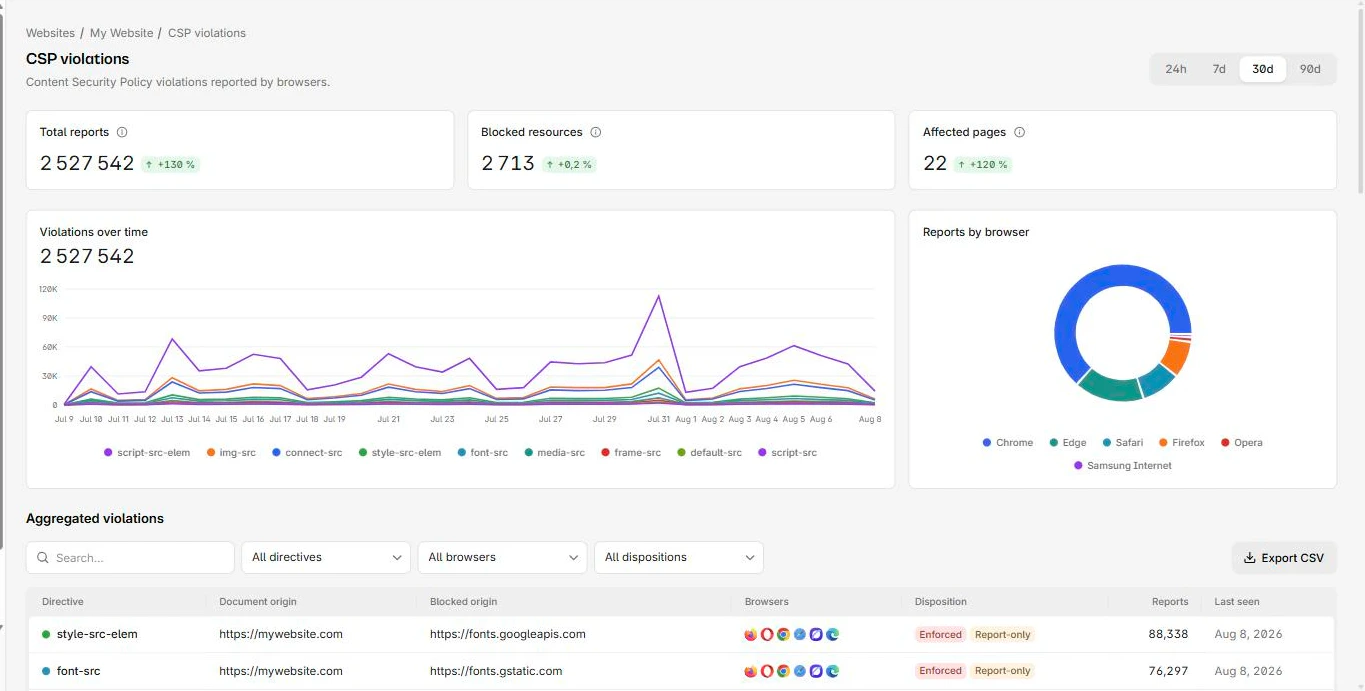
The consequence is that raw reports are hard to act on. You do not want a list of fifty thousand rows. You want to know the distinct origins and inline blocks your pages actually need, which of them are noise, and whether anything new just appeared. That means you need to group by directive and blocked resource, deduplicate, and filter, before the data is useful. A throwaway endpoint that only appends each POST to a log leaves all of that work to you.
Build vs buy your collector
You have two honest options, and the right one depends on how far you want to take it.
Build a throwaway endpoint when you just need to see whether reporting is wired up, or you are debugging one policy on a staging site. A few lines that accept the POST, branch on the content type, and write the JSON somewhere are enough to confirm reports are flowing. This is cheap and fine for a spike. What it does not give you is grouping, deduplication, retention, or any way to tell a real injection from a noisy extension at a glance. You will be reading raw JSON, and at production volume that stops working fast.
Run or use a collector when reporting is something you depend on. A collector is the endpoint plus everything you actually wanted: it accepts both content types, groups near-duplicate violations, deduplicates, separates extension noise from real issues, keeps history so you can see when a new script appeared, and alerts you when something changes on a sensitive page. You can build that yourself, it is a real project with a data store, ingestion, and a UI, or you can point the policy at a hosted one.
That hosted option is what the CentralCSP CSP suite is. You declare its URL as your endpoint, the browser POSTs violations there, and instead of raw rows you get them grouped by directive and origin, with the noise separated and the scripts on each page inventoried through CSP hash reporting. The decision is the usual one: a logger you maintain, or a collector that does the grouping and alerting for you.
If you only need to check what a live site currently sends and whether its policy points anywhere, the free CSP scanner reads the deployed headers without any endpoint setup.
A minimal endpoint, if you build it yourself
For a quick local endpoint that just captures both shapes, branch on the content type and store the body. This is the throwaway version, not a collector:
app.post("/csp-reports", (req, res) => {
  const type = req.headers["content-type"] || "";
  if (type.includes("application/reports+json")) {
    // modern: req.body is an array of report envelopes
    for (const report of req.body) store(report.body);
  } else if (type.includes("application/csp-report")) {
    // legacy: req.body is a single { "csp-report": {...} } object
    store(req.body["csp-report"]);
  }
  res.sendStatus(204);
});
Use a raw JSON body parser for both content types, return 204, and never let the handler throw, a 5xx just loses the report. Storing the rows is the easy part. The grouping, deduplication, and alerting on top are the work, and the reason most teams stop maintaining their own collector. For the full wiring of the headers and endpoint, see how to set up the browser Reporting API.
Sources
- MDN, Content-Security-Policy header
- MDN, Reporting API
- W3C, Content Security Policy Level 3
- W3C, Reporting API
- Dropbox engineering, on CSP reporting and filtering (extension noise)