Deprecation and intervention reports, catch breaking browser changes early
CentralCSP Team ·
Last update:
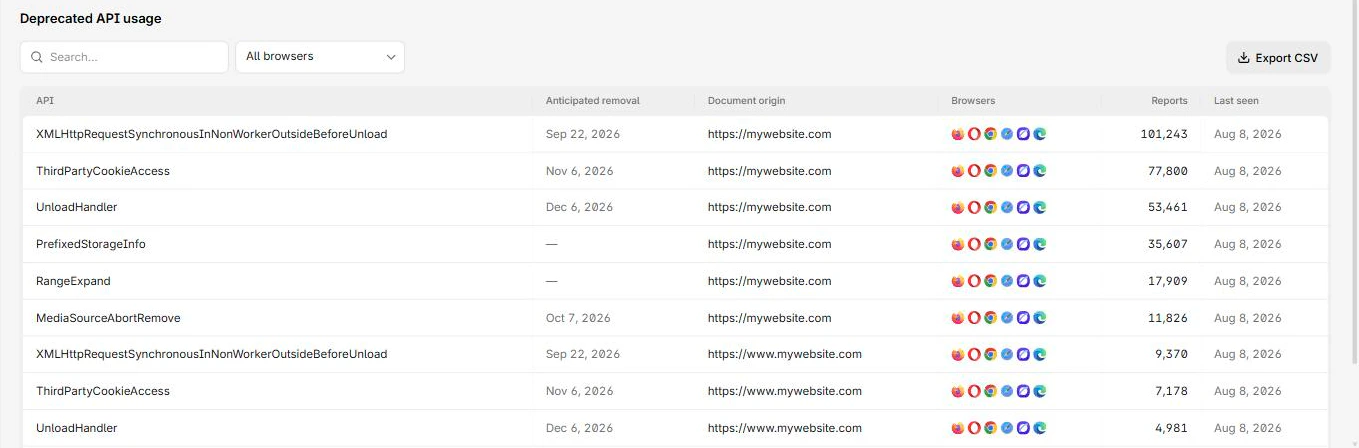
Browsers change under your feet. An API you depend on gets marked for removal, or the browser quietly decides not to do what your code asked because the device or network conditions made it a bad idea. Both events usually surface only as a console warning that no real user ever reports back to you. Deprecation and intervention reports turn those silent warnings into a stream you can collect from real traffic, so you find out a feature is breaking before a release does it for you.
Two warnings the browser already knows about
A deprecation report tells you that your page used an API or behavior the browser plans to remove. It is the structured version of the "this feature is deprecated and will be removed" message you have seen in the console, sent to a server instead of left on the user's machine. The point is lead time: you learn which pages still touch the old API while there is still time to migrate.
An intervention report tells you the browser refused or overrode something your code
asked for, because honoring it would have hurt the user. Classic examples are
blocking autoplay with sound, or refusing a document.write() call that would have
injected a script over a slow connection. Your code ran, but the browser stepped in,
and the intervention report is how you find out it did.
Both are observability, not enforcement. They never change behavior; they only tell you what already happened. Together they are an early-warning channel for the parts of your front end that depend on browser behavior you do not control.
How they reach you
Deprecation and intervention reports travel over the same
browser Reporting API as your CSP and
network reports, but they attach differently. A CSP report is tied to a specific
policy, so you point that policy at a named endpoint. A deprecation or intervention
report is not tied to any one policy, it can fire from anywhere on the page, so the
browser sends it to the endpoint named default.
That means there is no per-policy wiring to do. You declare a default endpoint
once with the
Reporting-Endpoints header,
and the browser routes both report types there automatically.
Reporting-Endpoints: default="https://<Endpoint-ID>.report.centralcsp.com"Serve that header on every page you want covered, since it only applies to the
response it is sent on. No directive, no parameter, the default name is the
contract.
What a deprecation report looks like
The browser sends a deprecation report
whose body names the deprecated feature and, where the browser provides them, a
message and a removal milestone, plus the source location that triggered it.
{
  "type": "deprecation",
  "body": {
    "id": "WebSQL",
    "message": "Web SQL is deprecated and will be removed.",
    "anticipatedRemoval": "2026-01-01T00:00:00.000Z",
    "sourceFile": "https://api-next.centralcsp.com/app.js",
    "lineNumber": 42,
    "columnNumber": 8
  }
}
The id is a stable identifier for the deprecated feature, so you can group reports
by it and track how many pages still depend on each one. anticipatedRemoval is the
browser's best guess at a removal date and may be absent. The sourceFile,
lineNumber, and columnNumber point at the exact call site, which is what makes
this more useful than a generic warning. A deprecation body carries id, message,
anticipatedRemoval, sourceFile, lineNumber, and columnNumber, though the
exact field set varies by browser, so treat fields beyond id and message as
best-effort.
What an intervention report looks like
An intervention report carries the
same shape: an id for the intervention, a human-readable message, and the source
location of the code the browser overrode.
{
  "type": "intervention",
  "body": {
    "id": "AudioContext",
    "message": "An AudioContext was prevented from starting automatically.",
    "sourceFile": "https://api-next.centralcsp.com/player.js",
    "lineNumber": 17,
    "columnNumber": 4
  }
}
Reading it is straightforward: the id tells you which browser intervention fired,
and the source location tells you which of your scripts triggered it. A burst of the
same intervention id from real users means a feature behaves differently in the
field than it did on your machine, often on slower devices or networks you do not
test on.
Use them as an ops signal
The value is in the trend, not the single report. A steady trickle of one
deprecation id is a backlog item; a sudden spike, or a new id appearing right
after a browser release, is a signal that a change is about to bite. Watch for:
- A new deprecation
idshowing up across many pages, which flags a dependency (often a third-party script) that uses an API on its way out. - An intervention
idthat only appears for a slice of users, which usually means a performance or autoplay behavior that differs by device or network. - A jump in either right after a Chromium release, which lines up your reports with the browser's own removal schedule.
Because delivery is best-effort, read these as an early-warning gauge, not a complete count. They tell you a problem exists and where to look, well before it becomes a support ticket.
Collect them in one stream
Deprecation and intervention reports are exactly the kind of low-volume, high-signal
data that gets lost if you only watch the console. CentralCSP ingests every browser
report type, so pointing your default endpoint at it
collects deprecations and interventions next to your
CSP, NEL, and other reports, grouped by id so a rising trend is visible instead of
buried. You see which features are going away across real traffic, not just the few
that happen to fire on a developer's laptop.
Next steps
- Wire the endpoints first: how to set up the Reporting API.
- Read the deprecation report reference and the intervention report reference.
- Declare the catch-all endpoint with Reporting-Endpoints.
Catch breaking browser changes early.
Sources
- Deprecation Reporting on MDN
- Reporting API specification (W3C)
- Deprecations and interventions on Chrome for Developers