

Connect a client
Set up Claude Code, Claude Desktop, Codex CLI, or any MCP client. One URL, OAuth sign-in, no secret to store.
Last update:
The server is configured with a single URL and no credential. Signing in happens in your browser through OAuth, so there is no key to paste, store, or rotate.
https://mcp.centralcsp.comSettings > AI tools in the dashboard generates the same snippets with your environment filled in, and is the place to check whether your plan includes the feature.
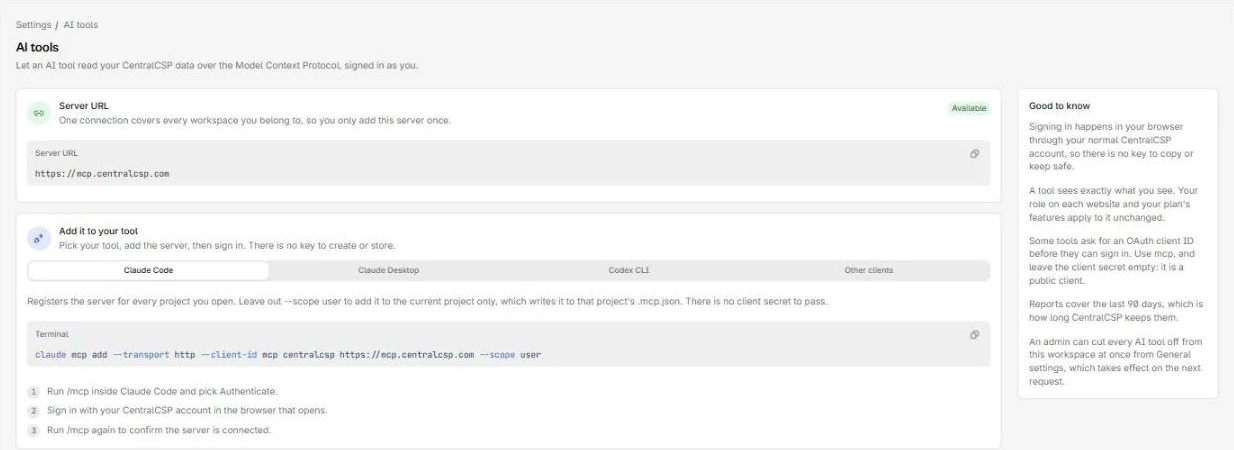
Claude Code
claude mcp add --transport http --client-id mcp centralcsp https://mcp.centralcsp.com --scope userThen:
- Run
/mcpinside Claude Code and pick Authenticate. - Sign in with your CentralCSP account in the browser that opens.
- Run
/mcpagain to confirm the server is connected.
--scope user registers it for every project. Leave it out to add it to the current project only, which writes to that project's .mcp.json.
Claude Desktop
Remote servers are added as custom connectors rather than from a config file.
- Open Settings, then Connectors, then Add custom connector.
- Paste
https://mcp.centralcsp.com. - Open the advanced settings and enter
mcpas the OAuth client ID. Leave the client secret empty. - Save, choose Connect, and sign in.
Codex CLI
[mcp_servers.centralcsp]
url = "https://mcp.centralcsp.com"
auth = "oauth"
Then:
- Run
codex mcp login centralcspto start the sign-in. - Sign in with your CentralCSP account in the browser that opens.
- Run
codex mcp listto confirm.
Codex registers itself with the sign-in server, so there is no client ID to set.
Use .codex/config.toml inside a trusted project to scope it to that project instead.
Any other client
Most clients take this shape:
{
  "mcpServers": {
    "centralcsp": {
      "type": "http",
      "url": "https://mcp.centralcsp.com"
    }
  }
}
Restart the client so it picks up the server, then approve the sign-in prompt.
Two variations to expect. Some clients name the transport streamable-http rather than http, and a few use servers as the top-level key. If the client asks for an OAuth client ID, use mcp with no secret.
Next steps
Quickstart
Add the CentralCSP MCP server to Claude Code, Claude Desktop, or Codex, sign in, then have the agent set up reporting and read what browsers report.
Permissions and safety
The server holds no credential of its own. It acts as you, with your roles and plan, and the workspace kill switch can cut it off entirely.