COOP and COEP explained, cross-origin isolation made practical
CentralCSP Team ·
Last update:
If you have tried to enable SharedArrayBuffer, use high-resolution timers, or run
certain WebAssembly workloads, you have hit a wall labelled cross-origin isolation,
and the two headers that turn it on: COOP and COEP. They are almost always searched as
a pair because one without the other does nothing. This post explains what each
header does, why they only work together, and how to turn them on without breaking
the third-party content already on your page.
What each header does
Cross-Origin-Opener-Policy (COOP) controls how your page shares a browsing context
group with the windows that open it or that it opens. With same-origin, the browser
severs the window.opener reference between your page and cross-origin windows, so a
popup or opener on another origin can no longer reach into your page's window object.
That blocks a class of cross-window scripting and side-channel attacks. Reference:
the COOP policy page.
Cross-Origin-Embedder-Policy (COEP) works on the other axis: it requires every
cross-origin resource your page loads to explicitly opt in to being embedded, either
through a Cross-Origin-Resource-Policy header or CORS (how CORP and COEP relate).
With require-corp, a cross-origin image or script that does not opt in is blocked.
That stops a page from silently pulling cross-origin data into its own process.
Reference: the COEP policy page.
Why you need both
Cross-origin isolation is a single browser state that gates a set of sensitive features
(SharedArrayBuffer, precise timers, and more). The browser only grants it when a
document closes both boundaries at once: the window boundary with COOP, and the
resource boundary with COEP.
Cross-Origin-Opener-Policy: same-originCross-Origin-Embedder-Policy: require-corpYou can confirm the result at runtime with self.crossOriginIsolated, which returns
true only when both headers are in force. Send one without the other and you get
no isolation and none of the features, which is why setting just COOP or just COEP
and expecting SharedArrayBuffer to work is a common dead end.
The hard part is COEP
COOP is usually easy: most pages do not depend on cross-origin window.opener
access, so same-origin just works. COEP is where rollouts stall. Turning on
require-corp blocks every cross-origin resource that does not send CORP or pass
CORS, and on a page with a dozen third parties (fonts, analytics, embeds, ad
tags), that can break a lot at once. The fix is not to guess which ones cooperate,
it is to measure.
Roll it out report-only first
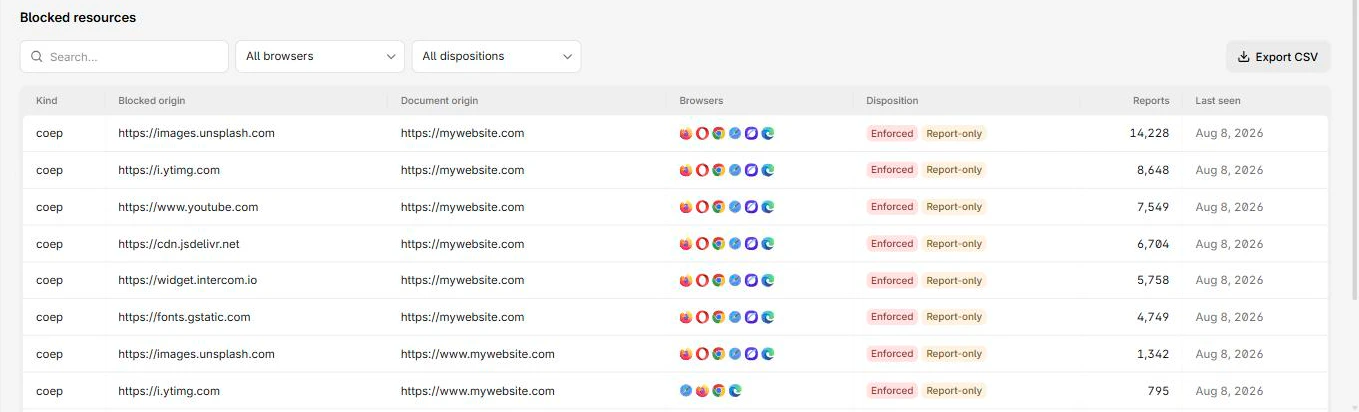
Both headers have a Report-Only variant that evaluates the policy and reports what would break, without actually enforcing it. Point it at an endpoint and collect the reports before you commit, so isolation does not take down a payment iframe in production.
Reporting-Endpoints: coep-endpoint="https://<Endpoint-ID>.report.centralcsp.com"Cross-Origin-Embedder-Policy-Report-Only: require-corp; report-to="coep-endpoint"The browser then sends a coep report for
each resource that would be blocked, giving you the exact list to fix or replace
before you enforce. The same Report-Only approach applies to COOP and its
coop reports.
Browser support note
The base COOP and COEP values are standard and widely supported. The credentialless COEP value is not supported in Safari, and report-to delivery for these policies is Chromium-only, so treat the reporting side as partial coverage.
Collect the rollout reports
The report-only step is only as good as your ability to see the reports. CentralCSP collects COOP and COEP reports alongside the rest of your browser reports, so you can size the real impact of isolation across your actual traffic, not just the third parties that happen to load on your own machine, and enforce once the report stream goes quiet.
Next steps
- Set up reporting first: how to set up the Reporting API.
- Read the COOP and COEP references.
- Retire the headers these replace: legacy security headers.
Roll out cross-origin isolation safely.