CSP enforce vs report-only mode
CentralCSP Team ·
Last update:
A Content Security Policy (CSP) can either block what it does not like or quietly tell you about it. Those are the two modes: enforce and report-only. Pick the wrong one and you either break a working page or ship a policy that protects nothing. This post shows the difference, when to use each, how to run both at the same time, and how to tell them apart in the reports your browser sends.
The short answer
Two HTTP response headers control which mode you are in.
Content-Security-Policyenforces the policy. The browser blocks anything that breaks a rule (an inline script, a request to a host you did not allow) and sends a violation report if you set up reporting.Content-Security-Policy-Report-Onlyenforces nothing. The browser lets everything load as usual, and only sends a report for what would have been blocked.
So enforce protects, report-only observes. You almost always start in report-only to learn how a policy behaves against real traffic, then switch the same rules to enforce once the reports are clean.
Content-Security-Policy | Content-Security-Policy-Report-Only | |
|---|---|---|
| Blocks a violating resource | ✅ Yes | ❌ No, it loads normally |
| Sends a violation report | ✅ Yes, when reporting is configured | ✅ Yes, that is its whole job |
disposition in the report | "enforce" | "report" |
| Can break a working page | ✅ Yes, that is the risk | ❌ No |
| Multiple policies combine | ✅ Yes, by intersection | ❌ No, each is evaluated alone |
Available in a <meta> tag | ✅ Yes | ❌ No, header only |
| Use it when | You trust the rules | You are still learning them |
Content-Security-Policy: default-src 'self'Content-Security-Policy-Report-Only: default-src 'self'; report-to csp-endpointReport-only watches without breaking anything
The Content-Security-Policy-Report-Only header helps you monitor violations without enforcing the security policy. Nothing is blocked. The browser evaluates each request against the policy, and where a request would have failed an enforced policy, it records a violation and sends a report instead.
That makes this header the safe way to test. You can write a strict policy, deploy it report-only, and watch what breaks in the reports without any user ever seeing a blocked script or a missing image.
There is one condition: report-only is only useful if reports have somewhere to go. The modern way to wire that up is the report-to directive, which names a group defined in a separate Reporting-Endpoints header. For how those two endpoint headers relate, see Report-To vs Reporting-Endpoints.
Reporting-Endpoints: csp-endpoint="https://<Endpoint-ID>.report.centralcsp.com"Content-Security-Policy-Report-Only: default-src 'self';
script-src 'self' https://trusted.example;
report-to csp-endpointWithout an endpoint, violations still surface in the browser DevTools console (see how to debug CSP violations in Chrome DevTools), but you have no central record and nothing to act on. For setting up the endpoint and the legacy report-uri fallback you send alongside report-to (covered in report-uri vs report-to), see getting started with CSP reporting.
One limit to know: report-only cannot be delivered from a <meta> tag. The spec does not support Content-Security-Policy-Report-Only inside a <meta> element (nor report-uri, frame-ancestors, or sandbox). A policy delivered by <meta> is always treated as enforcing. So report-only requires an HTTP response header. More on that split in CSP meta tags vs headers.
Enforce blocks the violation
Switch the same rules to the Content-Security-Policy header and the browser starts enforcing. Now a request that breaks a rule is blocked, and the resource never loads.
Content-Security-Policy: default-src 'self';
    script-src 'self' https://trusted.example;
    report-to csp-endpoint
You still get reports if you keep the reporting directive, but the difference is real: a blocked inline script does not run, a disallowed image does not appear. This is the mode you want once you trust the policy, because a policy that does not block does not protect against cross-site scripting (XSS) or formjacking.
In the DevTools console, the browser prefixes report-only violations with [Report Only] so you can tell at a glance whether a message came from a policy that blocked or one that only watched.
Run both at once to test a stricter policy
You do not have to choose. If a response carries both headers, the browser honors both independently. The Content-Security-Policy policy is enforced, and the Content-Security-Policy-Report-Only policy generates reports without being enforced.
This is the standard way to roll out a tighter policy without risk. Keep your current, working policy on the enforcing header so the site stays protected. Put the stricter candidate on the report-only header and watch its reports. When the report-only policy stops generating violations against live traffic, promote it to the enforcing header.
Content-Security-Policy: default-src 'self' https:;
    script-src 'self' https: 'unsafe-inline';
report-to csp-endpointContent-Security-Policy-Report-Only: default-src 'self';
script-src 'self' https://trusted.example;
report-to csp-endpointHere the page is protected by a loose enforced policy while you measure a strict candidate. The 'unsafe-inline' keyword in the enforced policy is what you are trying to remove; the report-only policy drops it and tells you what breaks. See why unsafe-inline defeats your CSP for the migration path.
Two enforced policies combine, report-only never does
A subtlety worth getting right: if you send more than one enforced policy, they stack by intersection. A resource has to satisfy every enforced policy to load, so each extra policy can only add restrictions, never relax them. The most restrictive rule wins.
A report-only policy is not part of that intersection. It never blocks, so it never participates in the allow-or-deny decision. Keep the two ideas separate: enforced policies combine and tighten each other; a report-only policy sits to the side and only reports.
Tell them apart in the report with disposition
Every CSP violation report carries a disposition field, one of the many CSP violation report fields, and its value is one of two strings:
"enforce"for a violation of an enforcingContent-Security-Policypolicy"report"for a violation of aContent-Security-Policy-Report-Onlypolicy
That single field lets a receiver know, per report, whether the violated policy actually blocked the resource or only watched it. A trimmed report body looks like this:
{
  "type": "csp-violation",
  "url": "https://api-next.centralcsp.com/page",
  "body": {
    "documentURL": "https://api-next.centralcsp.com/page",
    "effectiveDirective": "script-src",
    "disposition": "report",
    "blockedURL": "https://evil.example/x.js",
    "statusCode": 200
  }
}
The serialized value is the exact token "report", not "reporting". The same two strings are exposed on the DOM SecurityPolicyViolationEvent.disposition property if you handle violations in JavaScript instead of collecting reports.
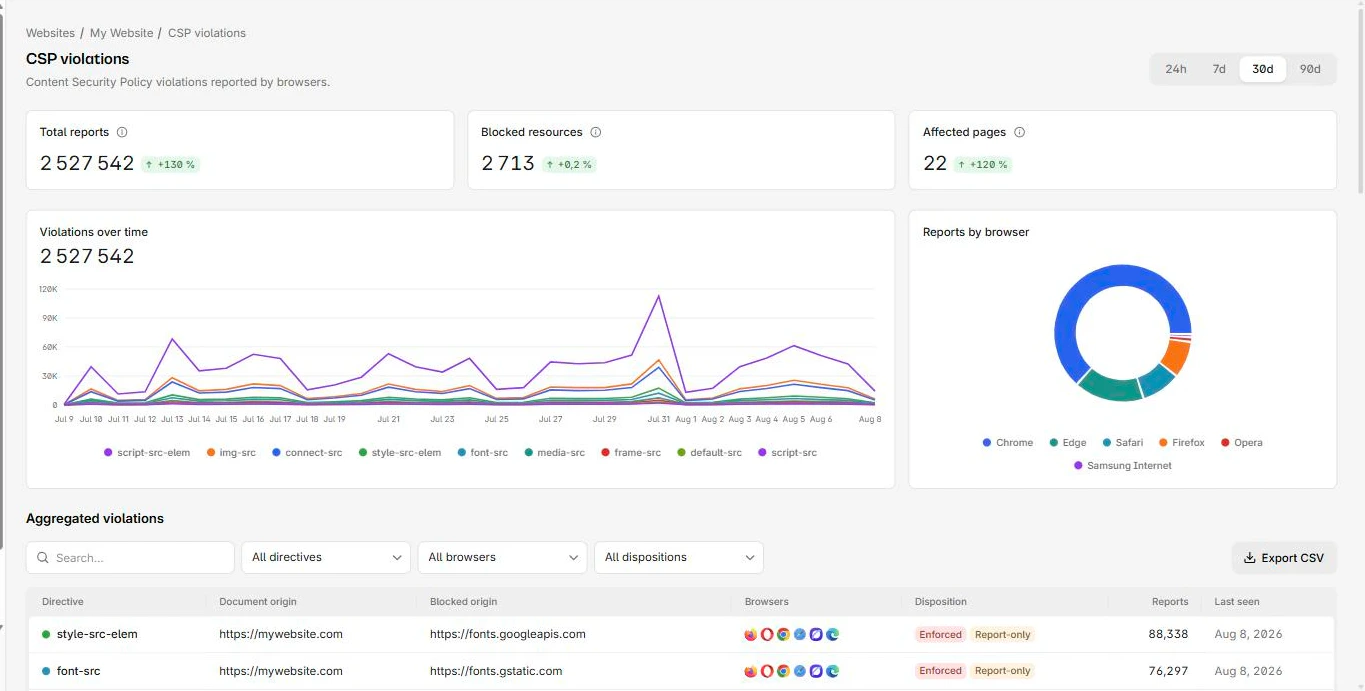
CentralCSP reads disposition on every report it ingests, so you can separate would-have-blocked events from actually-blocked ones, watch a report-only rollout, and confirm a policy is enforcing before you call it done. Point your report-to directive at a CentralCSP reporting endpoint and both modes flow into the same place.
A simple rollout
- Write your candidate policy and deploy it on
Content-Security-Policy-Report-Onlywith a reporting endpoint. - Watch the reports. Each one with
dispositionof"report"is something the policy would have blocked. Fix the real problems and loosen the policy only where a report is a false positive. - When the report-only policy is quiet against live traffic, move the same rules to
Content-Security-Policy. - Keep a stricter candidate on the report-only header to test your next tightening, and repeat.
Both headers are stable and widely supported, so this loop works everywhere a modern browser runs. Enforce when you trust the rules, report-only while you are still learning them, and read disposition to know which is which.
Step 2 is where the loop usually stalls: a busy site produces thousands of near-identical reports, and the signal is in which distinct sources repeat. CentralCSP groups incoming reports by directive and blocked origin and keeps disposition on each, so you can see the report-only candidate and the enforced policy side by side on the same site and tell whether a violation is a real block or a rehearsal.