Configure per-document features with Document-Policy
CentralCSP Team ·
Last update:
The Document-Policy header lets you switch document-level features and constraints on or off for a single page, for example turning off document.write, requiring images to declare their dimensions, or blocking synchronous XHR. The browser enforces the constraint, and if you ask it to, sends a document-policy-violation report when the page crosses one. This post covers what the header configures, the report-only variant for measuring before you enforce, and how the violation reports reach you through the Reporting API.
Limited availability
Document-Policy is a WICG Community Group draft, not a finished W3C standard. Only Chromium-based browsers implement it; Firefox and Safari do not implement Document-Policy at all. Even in Chromium most configuration points are experimental. Treat the lists below as Chromium-specific and confirm a point is actually usable before you rely on it.
What Document-Policy configures
The header is a list of configuration points, each one governing a single behavior of the document. A point takes a typed value: a boolean (?0 for off, ?1 for on), an integer, a float, or an enum. Which points exist is decided by the browser, not a fixed registry, so the practical move is to set the ones you care about explicitly and watch the reports.
Which points you can rely on depends entirely on the browser. In Chromium, two are usable in normal browsing:
js-profilingenables the JS Self-Profiling API, letting a page sample its own JavaScript so you can profile real-user performance in production.include-js-call-stacks-in-crash-reports=?1enriches a browser crash report with a JavaScript call stack, so a crash points you at the code that caused it.
Several other points are defined in the draft but experimental. They exist only in Chromium and only take effect behind the chrome://flags/#enable-experimental-web-platform-features flag, so you cannot depend on them for real users yet:
document-write=?0turns offdocument.write, a script-injection and rendering hazard that blocks the parser.unsized-media=?0requires media elements to declare a size, which prevents the layout shift an unsized image causes.oversized-imagescaps how far an image's intrinsic size may exceed its displayed size, so a page cannot ship a multi-megabyte image scaled down in CSS.sync-xhr=?0blocks synchronousXMLHttpRequest, which freezes the main thread.
A minimal example, using the experimental document-write point to show the header syntax:
Document-Policy: document-write=?0For the full, source-backed treatment of how the header parses and what each point means, see the Document-Policy reference.
The report-only variant
Document-Policy-Report-Only evaluates the same constraints and reports what would break, without actually enforcing anything. That matters here more than for most headers, because the set of configuration points is implementation-defined: you want to confirm what actually fires in your users' browsers before you block it.
Run it the same way you would the enforcing header, but point each constrained point at a reporting endpoint. First declare the endpoint with Reporting-Endpoints:
Reporting-Endpoints: doc-endpoint="https://<Endpoint-ID>.report.centralcsp.com"Then set the report-only policy and route the point at that endpoint:
Document-Policy-Report-Only: document-write=?0;report-to=doc-endpointEach point can carry its own report-to parameter. A leading *;report-to=endpoint sets a default endpoint for every point, and report-to=none disables reporting for a specific one. Once the report stream goes quiet for a constraint, you can move it from the report-only header to the enforcing Document-Policy header.
The document-policy-violation report
When the page does something a constraint forbids, the browser sends a document-policy-violation report to the endpoint you named. It tells you which point was violated and where, so you can find the code behind it.
{
  "type": "document-policy-violation",
  "age": 420,
  "url": "https://api-next.centralcsp.com/",
  "user_agent": "Mozilla/5.0 ...",
  "body": {
    "policyId": "document-write",
    "disposition": "report",
    "message": "Document policy violation: document-write is not allowed.",
    "sourceFile": "https://api-next.centralcsp.com/script.js",
    "lineNumber": 11,
    "columnNumber": 12
  }
}
The policyId names the configuration point, disposition is report in report-only mode and enforce once you enforce, and sourceFile with the line and column points straight at the offending code. One gotcha to plan for: the report received at your endpoint names the field policyId, but the in-browser ReportingObserver JS interface exposes the same value as featureId, so expect the JS-API name to differ from the wire field. The full payload and field reference is on the document-policy-violation report page.
Collect the reports without a backend
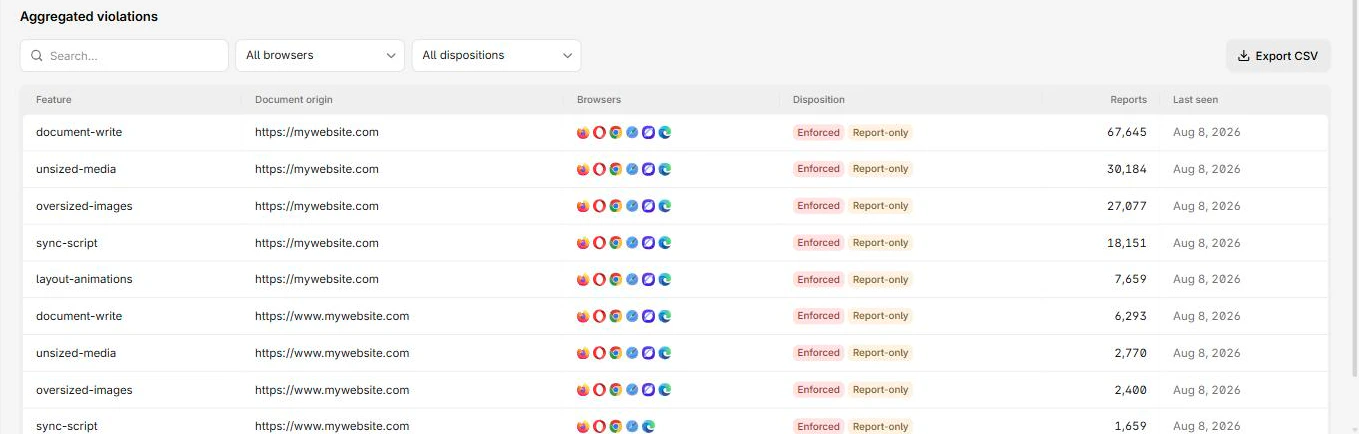
A document-policy-violation report uses the same delivery path as your other browser reports, so it arrives in the same stream as your CSP, NEL, and crash reports. Point the report-to endpoint at CentralCSP and the document-policy reports land next to the rest, charted and searchable, instead of needing a separate pipeline for an experimental feature. That is also where the report-only signal becomes useful: you can size what a constraint would break across real traffic before you enforce it.
Next steps
- Set up reporting end to end first: how to set up the Reporting API.
- Read the Document-Policy reference and the document-policy-violation report.
- See how the call-stack point feeds browser crash reports.
- Declare your endpoint with the Reporting-Endpoints header.
Collect Document-Policy reports from real browsers.