Lock down browser features with Permissions-Policy and get reports
CentralCSP Team ·
Last update:
A page you ship loads third-party scripts, ad tags, and embedded widgets, and any of
them can ask the browser for the camera, the microphone, or the user's location. The
Permissions-Policy
response header lets you decide which of these features the page and the iframes it
embeds are allowed to use, and turn off the ones you do not need. It is a response
header, so you set it once on the server and the browser enforces it on every request.
What Permissions-Policy controls
Browsers expose a long list of features that scripts can call: camera, microphone,
geolocation, fullscreen, autoplay, the Payment Request API, accelerometer, USB, and
more. Each one is governed by a named policy. Permissions-Policy lets you state, per
feature, who is allowed to use it: the page itself, specific origins, everyone, or no
one.
The default for most features is self, meaning your own origin can use the feature
but embedded cross-origin iframes cannot until you grant them access. Setting the
header lets you tighten that further (deny a feature outright) or loosen it
deliberately (allow a trusted embed). Denying a feature you never use shrinks the
attack surface: a compromised third-party script cannot prompt the user for their
location if the page has turned geolocation off.
This is observability and control at the browser level, not a firewall. The browser enforces the policy; nothing proxies or rewrites the request.
One caveat on support: header-level enforcement is effectively Chromium-only. Firefox
and Safari implement the iframe allow attribute model for some features, but they do
not enforce the Permissions-Policy response header the way Chromium does. Treat the
header as a Chromium enforcement and reporting layer, and rely on the allow attribute
for cross-browser per-frame control.
The header syntax
The header is a list of feature=allowlist entries separated by commas. The allowlist
sits in parentheses and lists the origins allowed to use that feature.
Permissions-Policy: camera=(), microphone=(), geolocation=(self)That example turns the camera and microphone off everywhere (an empty allowlist ()
means no origin at all), and allows geolocation only on your own origin.
The allowlist tokens are:
()denies the feature for everyone, including your own page.selfallows your own origin only.*allows every origin, your page and any embedded iframe."https://example.com"allows a specific origin (quoted). List several inside the parentheses, space separated.
Permissions-Policy: fullscreen=(self "https://embed.example.com"), autoplay=()Here fullscreen is allowed for your page and one trusted embed, and autoplay is off
for everyone. Pick the narrowest allowlist that still lets the page work: start from
() or self and only add an origin when an embed actually needs the feature.
How it relates to the iframe allow attribute
The header governs your top-level page and sets the outer limit for what any iframe
can be granted. The iframe allow attribute is the other half: it delegates a feature
to a specific embedded frame, within whatever the page-level policy already permits.
<iframe src="https://maps.example.com/" allow="geolocation"></iframe>For that iframe to actually get geolocation, two things must hold: your page's
Permissions-Policy must allow the iframe's origin (for example
geolocation=(self "https://maps.example.com")), and the allow attribute must
delegate the feature to the frame. The attribute can only narrow or pass along what
the header already allows; it can never grant a feature the page-level policy denied.
Think of the header as the ceiling and the allow attribute as the per-frame grant
underneath it.
It replaces the deprecated Feature-Policy
Permissions-Policy is the successor to the older Feature-Policy header. If you are
still serving Feature-Policy, it is time to retire it; we cover that alongside the
other headers worth dropping in
legacy security headers to retire.
The rename came with a syntax change. The old header used a space-separated list with quoted keywords:
-Feature-Policy: geolocation 'self'; camera 'none'
+Permissions-Policy: geolocation=(self), camera=()
The structure moved from feature 'value' separated by semicolons to
feature=(allowlist) separated by commas, 'self' became self (no quotes), and
'none' became an empty allowlist (). Origins are still quoted, but feature names
and keywords no longer are.
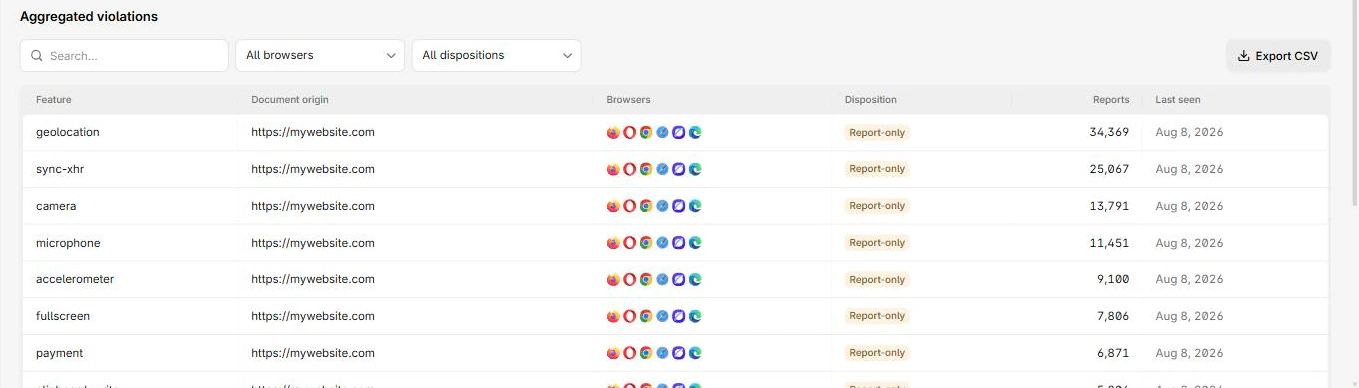
Getting permissions-policy-violation reports
A policy that denies a feature is more useful when you can see what tried to use it.
When a script or iframe attempts a feature the policy blocks, the browser can emit a
permissions-policy-violation report
through the Reporting API, naming the feature that was blocked and where the attempt
came from. That turns a silent denial into a signal: you learn which third party is
reaching for the camera, and whether a tightened policy would break a legitimate embed.
To receive these reports you declare an endpoint with the Reporting-Endpoints header,
the same wiring every other browser report uses. We walk through that end to end in
how to set up the Reporting API.
Reporting-Endpoints: default="https://<Endpoint-ID>.report.centralcsp.com"To test a policy without blocking, send it on the Permissions-Policy-Report-Only
header instead of the enforcing one. It reports each attempted use without denying it.
Select the reporting endpoint with a per-directive report-to= parameter, not a token
inside the feature's allowlist.
CentralCSP collects permissions-policy-violation reports next to your CSP, NEL, and
other browser reports, so you can monitor which features third parties are reaching
for and alert when something new appears, without building a receiver yourself. See how
we aggregate every browser report.
Where to start
Audit which powerful features your page and its embeds actually use, deny the rest with an empty allowlist, and wire up reporting so you find out when something tries a feature you turned off. Then watch the reports for a week before locking the policy down hard.
Start collecting Permissions-Policy reports.
Related
- Permissions-Policy header reference
- Legacy security headers to retire
- How to set up the Reporting API
- What is NEL, network error logging from the browser