

Delivery history
What was sent, to which channel, and whether it arrived. Retry behaviour, which failures are permanent, and how to read the Detail column.
Last update:
Alerts > Delivery history records every notification attempted for this website.
Delivery history is available to Viewer and above.
Go here when someone says they did not get an alert. It answers whether the alert fired at all, which is a different problem from whether it was delivered.
Status is Delivered, Failed, or Pending, and Pending covers both queued and mid-retry. A delivery sitting pending for more than a few minutes is being retried rather than stuck.
The channel name is captured at send time, so a renamed or deleted channel still reads as it was when the notification went out.
The list is newest first, 25 per page. There are no filters and no export.
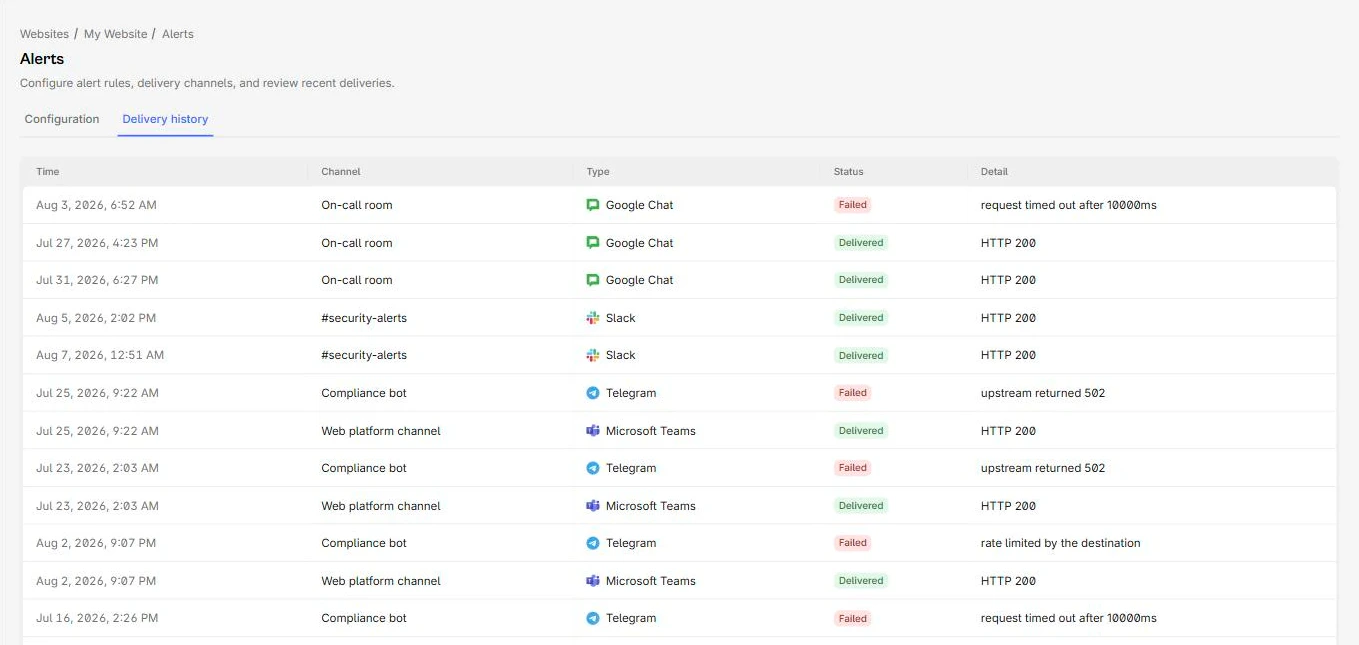
Delivered and failed rows sit together in the history:
Retries
Failed deliveries retry automatically, up to five attempts with exponentially increasing gaps starting at 30 seconds. There is no manual retry button.
Some failures are treated as permanent and are never retried, because repeating them cannot help:
| HTTP status | Why it is permanent |
|---|---|
400, 422 | The destination rejected the payload shape |
401, 403 | Credentials are wrong or revoked |
404, 410 | The webhook no longer exists |
Everything else, including 429 and any 5xx, is retried.
Detail column reasons
Alongside HTTP statuses you may see one of these reasons:
| Reason | Meaning |
|---|---|
channel_deleted | The channel was removed before the notification went out |
channel_disabled | The channel was off, including after auto-disable |
channel_config_invalid | The stored destination no longer validates |
no_authorized_recipients | An email channel whose recipients all lost access to this website |
event_missing | The underlying event was no longer available |
no_authorized_recipients is the one that surprises people. Email channels resolve to workspace members, and a member removed from the website is dropped from the recipient list. Remove the last one and the channel silently delivers to nobody. For more information, refer to Channels.
When nothing appears at all
An empty delivery history means no rule fired, not that delivery failed. Check in this order:
- Confirm the rule exists and is turned on.
- Confirm on the matching report page that the event occurred in the window.
- Check that the rule was created before the event, because rules never replay history.
- Check that the cooldown has not folded the finding into a notification you already received.
If the history shows repeated failures, look at the channel: five consecutive failures switch it off automatically, and it stays off until you turn it back on.