

Rules
Pick an event, pick channels, set a cooldown. The fourteen events available, and how to tune a spike rule so it fires on something real.
Last update:
A rule watches one event and notifies one or more channels when it fires.
Adding a rule requires the website Manager role, and at least one channel.
Add a rule
Alerts > Configuration > Add rule.
| Field | Notes |
|---|---|
| Name | What the notification is called |
| Event | Grouped by surface. Cannot be changed after creation |
| Channels | One or more, up to 20. Required |
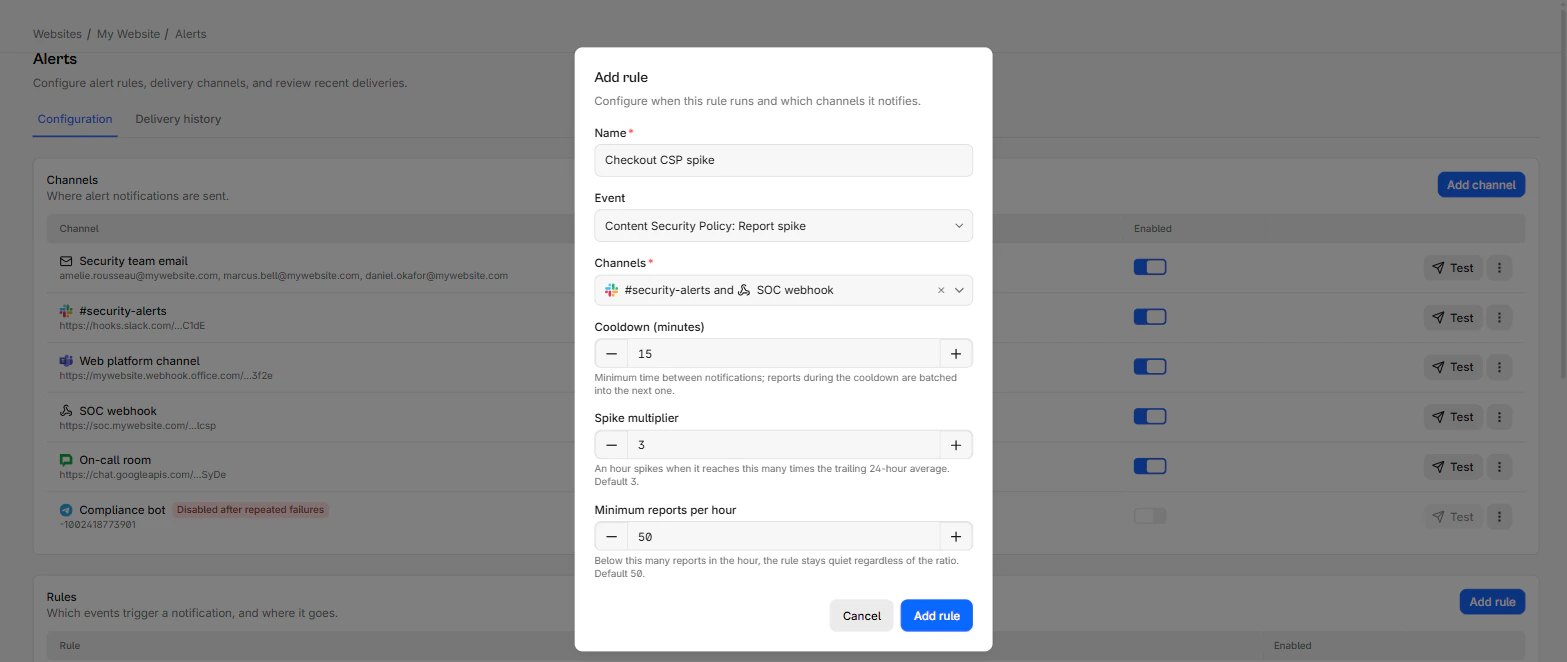
| Cooldown (minutes) | Default 15. Minimum time between notifications |
| Spike multiplier | Spike events only. Default 3 |
| Minimum reports per hour | Spike events only. Default 50 |
To change which event a rule watches, create a new rule and delete the old one.
A spike event adds the multiplier and the floor to the dialog:
The 14 events
The events are grouped by the surface they watch:
| Surface | Events |
|---|---|
| Content Security Policy | New violation type, Report spike |
| Script hashes | New script origin |
| Subresource Integrity | Report spike |
| PCI compliance | Unjustified script on payment pages |
| Network errors | New failing origin, Report spike |
| Crashes | Report spike |
| COOP | New violation type |
| COEP | New violation type |
| Permissions Policy | New violation |
| Connection allowlist | New blocked origin |
| Deprecations | New deprecated API usage |
| Interventions | New browser intervention |
"New" events fire the first time something is observed. Because reports are kept for 90 days, something that goes quiet for a quarter and returns is treated as new again.
Cooldown
Cooldown is the minimum gap between notifications for a rule, entered in minutes and defaulting to 15.
It does not drop anything. Findings during the cooldown are batched into the next notification, so a burst produces one grouped message rather than 50.
Set it against how you consume alerts. 15 minutes suits a chat channel. For a rule that pages someone, set a longer cooldown. The maximum is 24 hours. A value above 1,440 minutes is rejected.
Tune a spike rule
Spike rules compare the last completed hour against the average of the previous 24 hours. Two settings control them, and both matter.
Spike multiplier is how many times the trailing average the hour must reach. Default 3, range 1.5 to 100.
Minimum reports per hour is a floor. Below it the rule stays quiet no matter the ratio. Default 50, range 1 to 1,000,000.
The floor is what stops the false alarms
On a low-volume site the multiplier alone is useless: going from two reports an hour to eight is a 4x spike and means nothing. The floor is what makes spike rules usable. Set it above your normal hourly volume, not below it.
Leaving both at their defaults stores no configuration at all, so the rule follows any future change to the defaults. Setting them explicitly pins your values.
Wait until you know a site's normal volume before adding spike rules. Created on day one, the 24-hour baseline is still forming and the rule fires on the ramp-up.
A rule set that works
For most sites, three rules:
| Event | Channel | Cooldown |
|---|---|---|
| CSP, New violation type | Chat | 15 min |
| PCI compliance, Unjustified script | Chat plus email to the compliance owner | 60 min |
| Script hashes, New script origin | Chat | 60 min |
Add spike rules after a couple of weeks, once the numbers mean something.
Rule state and deletion
The Enabled switch stops a rule without losing its configuration. Useful during a migration that will generate noise you already understand.
Deleting a rule discards anything pending for it.