

PCI DSS v4 script controls
Define payment-page scope, review every script observed there, and export an evidence pack. Supports PCI DSS v4 requirements 6.4.3 and 11.6.1.
Last update:
PCI DSS v4 requires you to know which scripts run on your payment pages, to authorize each one, and to detect when any of them changes. CentralCSP builds that inventory from CSP hash reports and gives you somewhere to record the decisions.
CentralCSP helps you meet requirements 6.4.3 and 11.6.1. It does not certify you, and your assessor decides whether your evidence is sufficient.
PCI DSS monitoring requires a plan that includes compliance.
The order of operations
Nothing works until scope is defined, because the inventory only contains scripts seen on a page that matches a payment-page pattern.
- Define payment pages. URL patterns that put pages in scope.
- Automate the obvious. Rules that justify trusted scripts by URL pattern, so review is a short list rather than a long one.
- Review what is left. Justify or reject each script, in writing.
- Export the evidence pack when your assessor asks.
Then keep going. A changed hash sends a script back for review, which is the ongoing part of 11.6.1.
The overview page collects coverage, scope, and the three counters in one view:
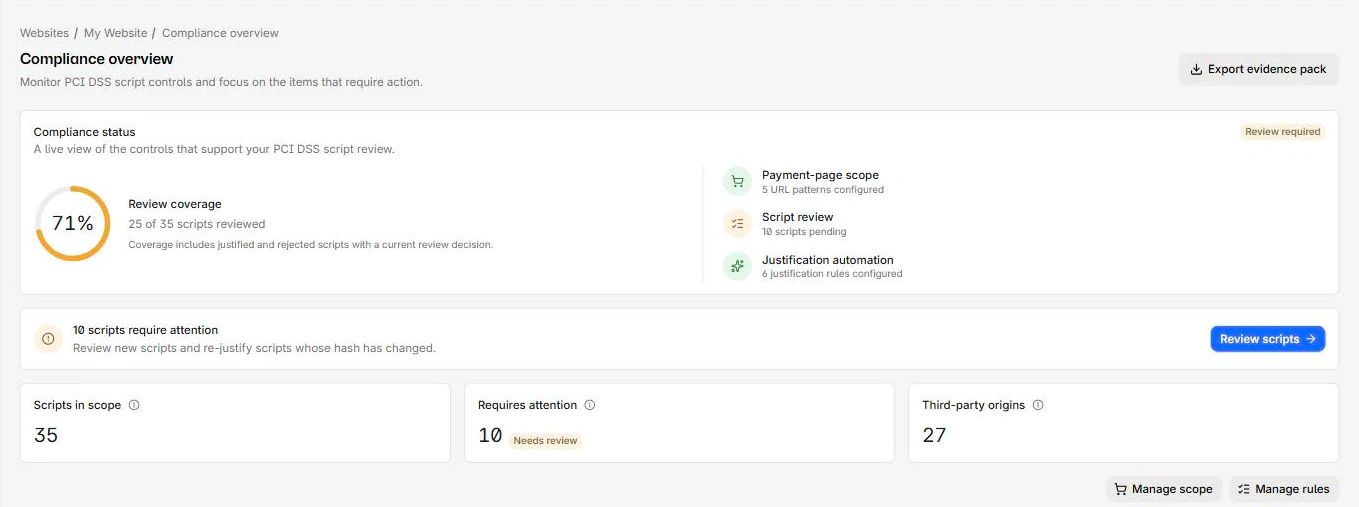
Overview page metrics
Review coverage is (justified + rejected) / all scripts in scope, rounded. Both decisions count as reviewed, because rejecting a script is a decision. Retired scripts are excluded.
Requires attention counts scripts that are Unreviewed or Needs review. That number reaching zero is the goal, and it will not stay there, since new scripts and changed hashes push it back up.
A website has four compliance statuses:
| Status | Means |
|---|---|
| Setup incomplete | No payment-page patterns defined, so nothing is in scope |
| Monitoring | Scope defined, no scripts observed yet |
| Review required | Scripts are waiting for a decision |
| Up to date | Every script in scope has a decision |
A disabled pattern still counts as scope here
The website status counts payment-page patterns whether or not they are enabled, so a site whose only pattern is disabled reads Monitoring or Up to date rather than Setup incomplete. The workspace Compliance page counts only enabled patterns and disagrees. Check the Enabled column on Payment pages rather than trusting the status.
Third-party origins counts origins classified as third party. Note it only ever grows: origin records are not deleted when the scripts behind them leave scope. For more information, refer to Origins.
Workspace compliance
The workspace-level Compliance page compares every site you can access.
Portfolio readiness is the share of your websites that have both a reporting endpoint enabled and at least one enabled payment-page pattern. It measures setup, not review quality, so a site can be 100% ready with every script unreviewed.
The per-site table adds a fifth status, Reporting disabled, for sites not collecting at all. Sites are sorted worst first, and the top one drives the priority action card.
Who can do what
Each action needs a minimum website role:
| Action | Minimum website role |
|---|---|
| View everything, export the inventory CSV and the evidence pack | Viewer |
| Justify or reject a script | Analyst |
| Edit payment pages, rules, tags, origins, and refresh the inventory | Manager |
Giving your reviewers Analyst and not Manager is the useful split: they can make review decisions without being able to change what is in scope. For more information, refer to Access control.