

Justify scripts
Record why each script on a payment page is authorized, or reject it. Both decisions require written reasons and both land in an append-only ledger.
Last update:
Every script in scope needs a decision: justified, meaning it belongs and here is why, or rejected, meaning it does not. Both are recorded with your name, the timestamp, and the hash the decision applied to.
Requires the website Analyst role or higher.
Make a decision
Work through the review queue like this:
- Open PCI DSS > Script inventory and the Action required tab.
- Select a script to open its drawer.
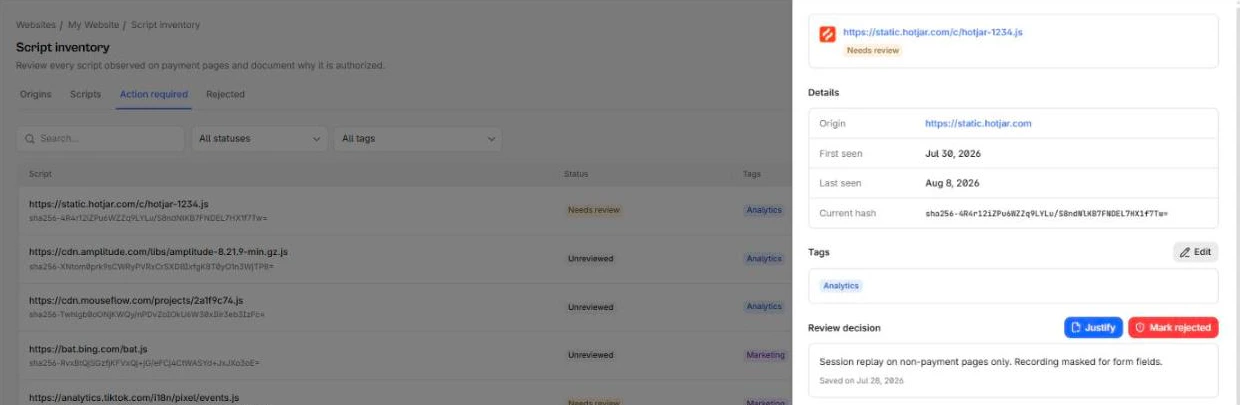
- Under Review decision, select Justify or Mark rejected.
- Write the reason and save.
The text field is required, up to 4096 characters. There is no way to record a decision without one, which is the point: the text is the evidence.
A decision can be revised afterwards. Every revision is a new ledger entry rather than a replacement.
The decision lives in the Review decision block of the script drawer:
Write justifications an assessor can use
The justification should answer why this code is allowed to run where cardholder data is entered. Useful ones name the business function, the owner, and the review.
Good: Stripe.js tokenizes card fields. Required for checkout. Vendor due diligence completed 2026-02, owner is Payments team.
Not useful: needed, ok, third party.
You are writing for someone who does not know your stack and will read a few hundred of these.
Justify versus reject
Justify records that the script belongs, and pins the decision to the script's current hash. If the content at that URL changes later, the script moves to Needs review and comes back to you.
Reject records that it does not belong.
Rejecting does not block the script
Marking a script rejected is a record of your decision, nothing more. The script keeps loading. Remove it from the page or block it in your CSP as a separate action, then confirm it stops appearing.
Rejection is permanent against automation: no justification rule re-justifies a rejected script.
Changed hashes
Needs review means a script you already justified now serves different content.
Do not re-justify reflexively. The question is whether the change was expected:
- Your own bundle after a deploy: expected, re-justify.
- A vendor script matching a release they announced: verify, then re-justify.
- A vendor script changing with no corresponding release: investigate before deciding. This is the case the requirement exists for.
The Hash history tab on the script gives the full sequence of hashes with first and last seen, which is how you tell a routine cadence from an anomaly.
The history trail
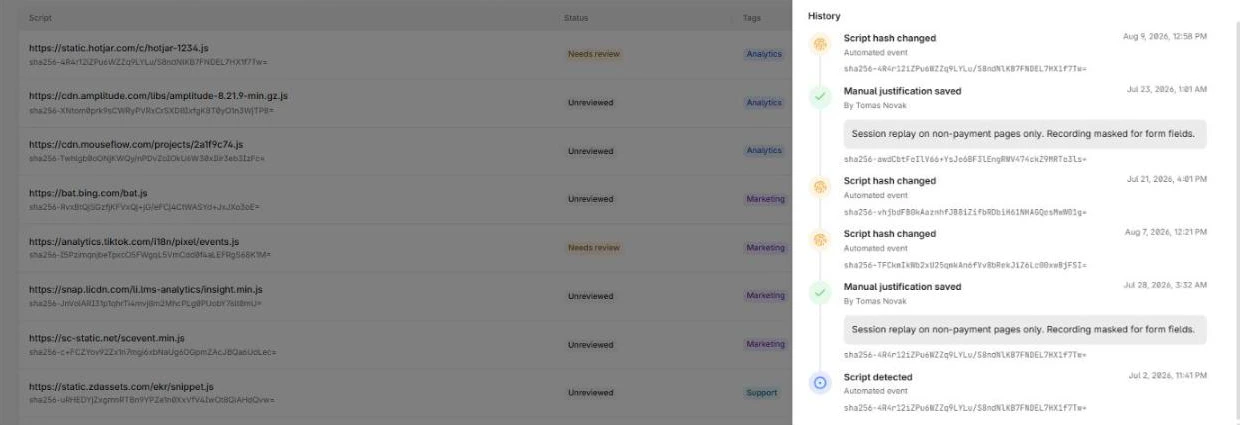
The History section records every event on the script:
| Event | Meaning |
|---|---|
| Script detected | First seen in scope |
| Script hash changed | Content at the URL changed |
| Justification rule applied | A rule justified it automatically |
| Manual justification saved | A person justified it |
| Script marked rejected | A person rejected it |
| Script left the payment-page scope | Retired, no longer matching scope |
| Script returned to the payment-page scope | Back in scope |
Each entry carries the timestamp, who did it, the text they wrote, and the hash at the time. Automated events show as such rather than naming a person.
The ledger is append-only. Nothing in the product edits or deletes an entry, and history survives a script leaving and re-entering scope. It is not cryptographically sealed or signed, so describe it to an assessor as an append-only application log rather than as tamper-proof.
Deleting a user anonymizes their identifier on past entries. The events themselves remain.
The timeline of one script alternates hash changes with justifications:
Tags
Managers can attach tags to classify scripts, for example by owner or by vendor category. Saving replaces the whole tag set on that script. For more information, refer to Tags.