

Origins
Every origin serving scripts on your payment pages, classified first-party or third-party. The automatic classification is stricter than you expect.
Last update:
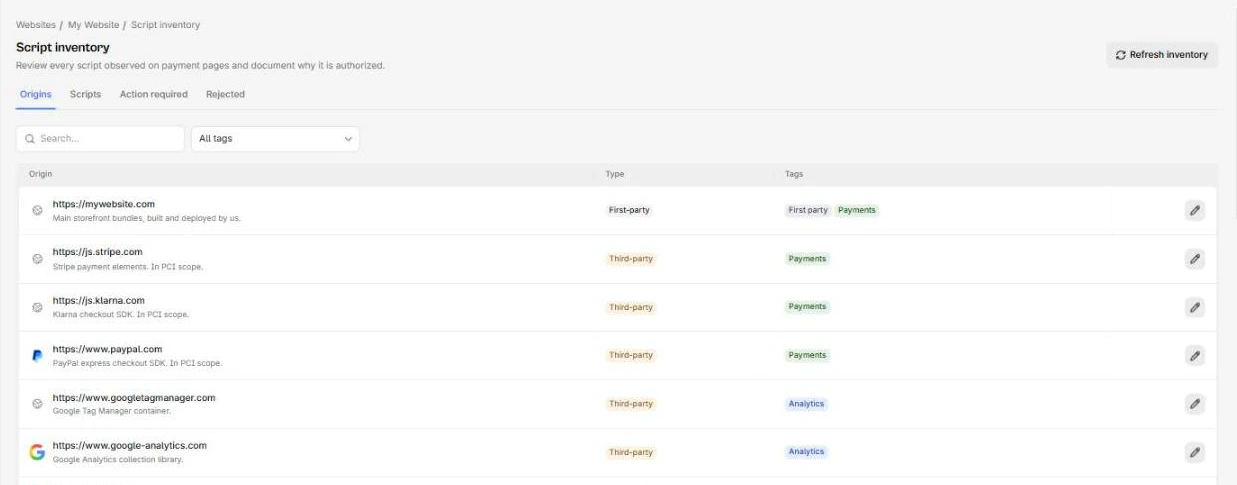
The Origins tab of the script inventory lists every origin serving scripts in scope, with a first-party or third-party classification and a description you control.
It is the fastest way to answer "who runs code on your checkout", which is usually the first question an assessor asks.
Automatic classification
An origin is classified once, the first time it is seen, by comparing its hostname against your website's URL. Exact hostname match is first-party. Everything else is third-party.
Your own subdomains are classified third-party
The comparison is exact, so if your site is shop.example.com then cdn.example.com and assets.example.com are both recorded as third-party. This is deliberate, since a subdomain can be operated by a different team or vendor, but it means the third-party count starts higher than you expect. Correct them by hand.
The Origins tab carries the type and tags for each origin:
Correct a classification
Managers can edit any origin. Two fields:
- Type: First-party or third-party.
- Description: Free text. Use it to name the owner or purpose.
Fix your own infrastructure first, then describe the genuinely external ones. A description like Stripe, card tokenization, owner Payments turns the origins list into something you can hand over without narrating it.
Origin lifecycle limits
Origins are created by reconciliation and cannot be created or deleted by hand. They appear when a script from them enters scope.
They are also never removed. An origin whose scripts have all retired stays in the list, and keeps counting toward the Third-party origins metric on the compliance overview. That number drifts upward over time and should be read as "origins ever seen", not "origins currently active".
To see what an origin is currently serving, select it to open the Scripts tab filtered by it.
Vendor review
The origins list is the natural input to a periodic vendor review, because it is short and it is factual.
Work down the third-party rows and ask three things: do we have a contract with them, do we know what their script does, and would we notice if it changed. The third one is answered by whether a justification rule covers them, since a rule means hash changes are auto-approved rather than reviewed.
For providers where silent changes matter, leave them out of your rules so every change comes back for review.
Next steps
Justification rules
Automatically justify trusted scripts by URL pattern. Rules apply retroactively, first match wins, and a rejection is never overwritten.
Tags
Reusable labels for classifying scripts, applied by hand or automatically by justification rules. Per-website, and deleting one changes nothing else.