

Justification rules
Automatically justify trusted scripts by URL pattern. Rules apply retroactively, first match wins, and a rejection is never overwritten.
Last update:
A justification rule justifies any script whose URL matches a pattern, so routine approvals do not consume review time. Use them for your own origin and for providers you have already vetted.
Requires the website Manager role.
Add a rule
PCI DSS > Justification rules > Add rule. Four fields:
| Field | Notes |
|---|---|
| Name | A label, such as Approved payment provider |
| Script URL pattern | * is the only wildcard, matches any characters including slashes |
| Justification | Required, and this is the text an assessor reads |
| Tags | Optional, applied to every script the rule matches |
https://js.stripe.com/*Write the justification as a business reason. "Card tokenization for checkout, contract reviewed 2026-03" is evidence. "Trusted" is not.
Up to 200 rules per website.
Rules are listed in creation order:
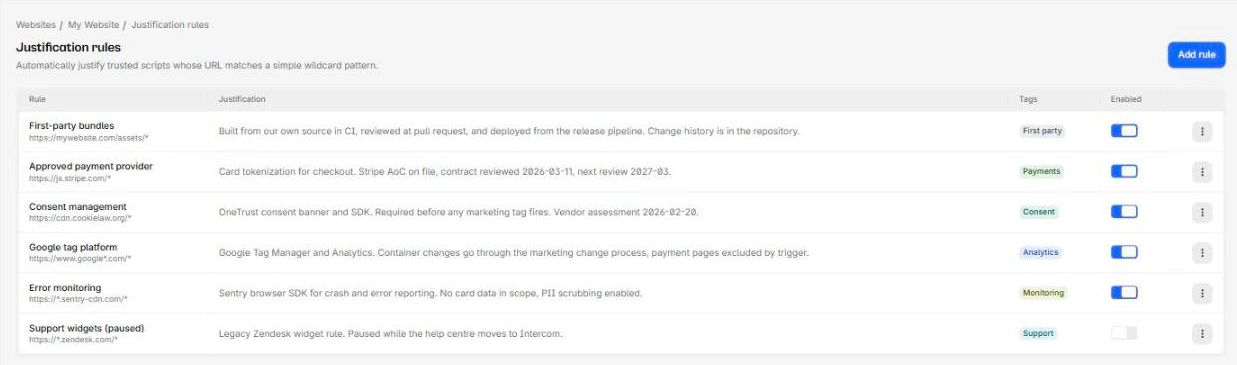
Pattern anchoring
Same syntax as payment pages, and the same trap: the pattern is anchored, so it must match the entire script URL.
https://*.stripe.com/* matches https://js.stripe.com/v3/. A bare stripe.com matches nothing at all.
Retroactive application
Creating or updating a rule rebuilds the inventory immediately, and the rule justifies scripts already in the inventory, not just ones detected later.
That is what makes rules worth writing first. Add your rules before you start reviewing by hand, and the manual list is whatever is left.
Precedence
Rules are evaluated in creation order, oldest first, and the first match wins. Remaining rules are not evaluated. There is no priority control in the interface, so if two rules could match the same script, the older one applies.
What a rule will and will not overwrite:
| Script state | Rule applies? |
|---|---|
| Unreviewed | Yes |
| Needs review, hash changed | Yes |
| Justified manually, hash unchanged | No, your wording is kept |
| Justified manually, hash then changed | Yes, the rule takes over |
| Rejected | Never |
A hash change hands a manual justification to a rule
When a manually justified script changes hash, a matching rule takes it over: the rule's justification replaces yours and the record stops naming you as the reviewer. If a specific script needs a human decision every time it changes, make sure no rule pattern covers it.
Rejection is the only absolute. A script you marked rejected is never re-justified by automation.
Turn off or delete a rule
The Enabled switch stops a rule matching anything new. It does not un-justify scripts the rule already justified. They keep their status and justification until something makes them reviewable again, such as a hash change.
Deleting behaves the same way, and existing entries stay in the ledger. One quirk: deleting a rule does not trigger a rebuild, though nothing about existing scripts would change anyway.
When a rule stops working
A rule whose stored pattern no longer compiles is skipped silently during reconciliation, and its scripts stay unreviewed. If a rule you expect to be working leaves scripts in Action required, re-save it to revalidate the pattern.
Next steps
Justify scripts
Record why each script on a payment page is authorized, or reject it. Both decisions require written reasons and both land in an append-only ledger.
Origins
Every origin serving scripts on your payment pages, classified first-party or third-party. The automatic classification is stricter than you expect.