

Groups
Bundle members so you grant website access once instead of per person. Groups carry no permissions themselves until a website grants them a role.
Last update:
A group is a named set of workspace members. Groups hold no permissions on their own. They become useful when a website grants a group a role, and every member of that group inherits it.
Groups live under Team > Groups, and only Admins can open the page.
Create a group
Select Create group, then enter a name. Name is the only field.
Name groups after the team or responsibility rather than the access, so Payments squad rather than Managers. The role is decided per website, and a group named after a role becomes wrong the moment it holds a different one somewhere else.
The groups list shows the member count for each group:
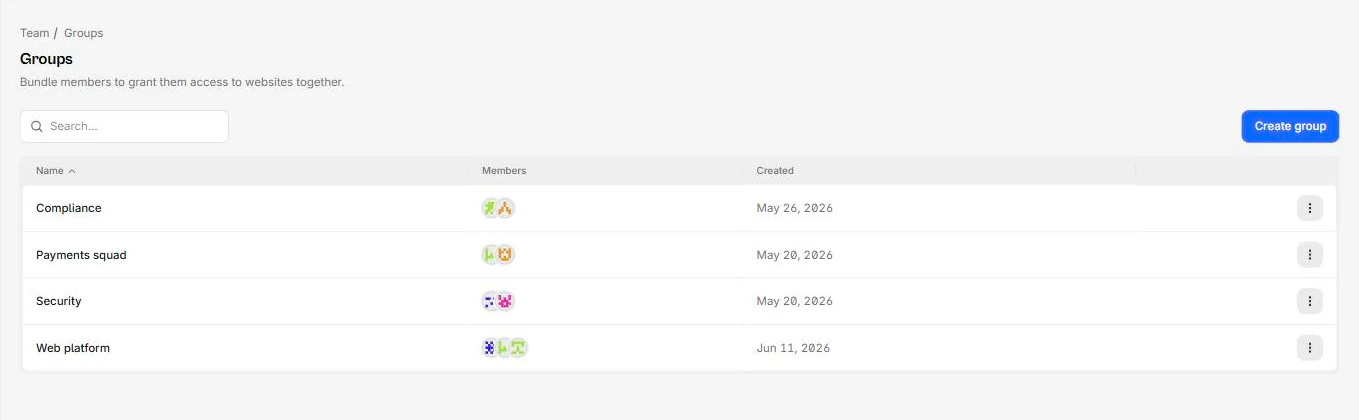
Add members
Row menu, Manage members. Add from the workspace member list, or remove someone.
Changes take effect immediately, on every website the group has access to. Removing someone from a group they were relying on can cut their access across several sites at once, which is exactly the point but worth confirming first.
Grant a group access to a website
This does not happen here. Go to the website's Settings > Access control, Groups, Add group, then choose a website role.
The same group can hold different roles on different sites: Manager on the sites that team owns, Viewer everywhere else. For more information, refer to Website access.
When to use groups
Use a group once you pass a handful of people. Per-person grants across a dozen websites are impossible to audit and quietly drift out of date.
A structure that works:
| Group | Typical access |
|---|---|
| One per delivery team | Manager on that team's sites |
| Security | Analyst on payment-facing sites, Viewer elsewhere |
| Compliance | Viewer everywhere, Analyst where they own script review |
Onboarding then becomes one action: add the person to their team's group.
Interaction with direct grants
Someone can hold both a direct grant and a group grant on the same website. They get the higher role.
When revoking access, remove both. Deleting the direct grant while a group still confers Manager leaves them a Manager, and the People table gives no hint that the Groups table is the reason.
Delete a group
Deleting a group removes it and every website access rule it carried. Members lose whatever the group granted them, keeping any direct grants they hold.
Group creation, updates, deletion, and membership changes are all recorded in the audit log.