For developers
Ship the site. Keep the browser under watch.
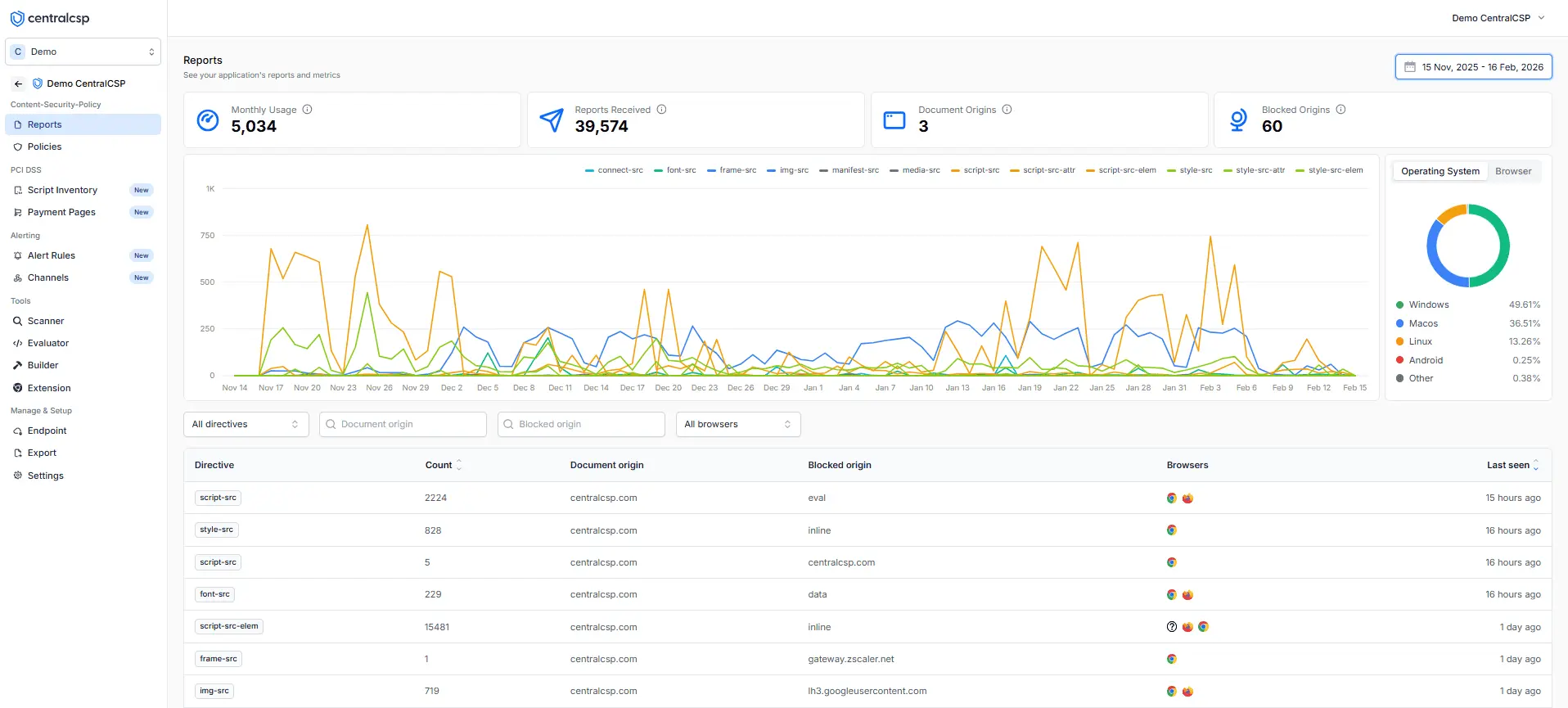
One response header collects CSP and browser security reports from your real traffic: violations to debug, alerts to act on. No agent, no SDK.
- 1.5B
- reports ingested
- 12
- report types collected
- 0
- agents or SDKs to install
- 100%
- EU data residency
The blind spot
Your server tools stop at the response.
Third-party scripts, injected code and policy violations execute in the browser, after the page leaves your infrastructure. CentralCSP collects the signal browsers already emit and routes it back to your stack.
01 - Browsers
Native Reporting-API signals from your real production traffic.
'%20gradientUnits='userSpaceOnUse'%3e%3cstop%20offset='0'%20style='stop-color:%23d93025'/%3e%3cstop%20offset='1'%20style='stop-color:%23ea4335'/%3e%3c/linearGradient%3e%3cpath%20d='M256%20128h221.6C407%205.6%20250.5-36.3%20128.1%2034.3%2089.2%2056.8%2056.8%2089.1%2034.4%20128l110.8%20192h.1c-35.4-61.1-14.6-139.3%2046.5-174.7%2019.4-11.4%2041.6-17.3%2064.2-17.3'%20style='fill:url(%23a)'/%3e%3ccircle%20cx='256'%20cy='256'%20r='101.3'%20style='fill:%231a73e8'/%3e%3clinearGradient%20id='b'%20x1='221.057'%20x2='442.694'%20y1='5.455'%20y2='389.341'%20gradientTransform='matrix(1%200%200%20-1%200%20514)'%20gradientUnits='userSpaceOnUse'%3e%3cstop%20offset='0'%20style='stop-color:%23fcc934'/%3e%3cstop%20offset='1'%20style='stop-color:%23fbbc04'/%3e%3c/linearGradient%3e%3cpath%20d='M366.8%20320%20256%20512c141.3%200%20255.9-114.5%20255.9-255.9%200-45-11.8-89.1-34.3-128H256v.1c70.6-.1%20127.9%2057%20128.1%20127.6%200%2022.5-6%2044.7-17.3%2064.2'%20style='fill:url(%23b)'/%3e%3clinearGradient%20id='c'%20x1='283.689'%20x2='62.052'%20y1='18.014'%20y2='401.901'%20gradientTransform='matrix(1%200%200%20-1%200%20514)'%20gradientUnits='userSpaceOnUse'%3e%3cstop%20offset='0'%20style='stop-color:%231e8e3e'/%3e%3cstop%20offset='1'%20style='stop-color:%2334a853'/%3e%3c/linearGradient%3e%3cpath%20d='M145.2%20320%2034.4%20128.1C-36.3%20250.5%205.6%20407%20128%20477.7c38.9%2022.4%2083.1%2034.3%20128%2034.3l110.8-192-.1-.1c-35.2%2061.2-113.3%2082.3-174.5%2047.1-19.5-11.2-35.8-27.4-47-47'%20style='fill:url(%23c)'/%3e%3c/svg%3e)

'%3e%3cstop%20offset='.76'%20stop-opacity='0'/%3e%3cstop%20offset='.95'%20stop-opacity='.5'/%3e%3cstop%20offset='1'/%3e%3c/radialGradient%3e%3cradialGradient%20xlink:href='%23a'%20id='j'%20cx='2523'%20cy='4680'%20r='20243'%20gradientTransform='matrix(-.03715%20.99931%20-2.12836%20-.07913%2013579%203530)'%3e%3cstop%20offset='0'%20stop-color='%2335c1f1'/%3e%3cstop%20offset='.11'%20stop-color='%2334c1ed'/%3e%3cstop%20offset='.23'%20stop-color='%232fc2df'/%3e%3cstop%20offset='.31'%20stop-color='%232bc3d2'/%3e%3cstop%20offset='.67'%20stop-color='%2336c752'/%3e%3c/radialGradient%3e%3cradialGradient%20xlink:href='%23a'%20id='k'%20cx='24247'%20cy='7758'%20r='9734'%20gradientTransform='matrix(.28109%20.95968%20-.78353%20.22949%2024510%20-16292)'%3e%3cstop%20offset='0'%20stop-color='%2366eb6e'/%3e%3cstop%20offset='1'%20stop-color='%2366eb6e'%20stop-opacity='0'/%3e%3c/radialGradient%3e%3cpath%20id='b'%20d='M24105%2020053a9345%209345%200%200%201-1053%20472%2010202%2010202%200%200%201-3590%20646c-4732%200-8855-3255-8855-7432%200-1175%20680-2193%201643-2729-4280%20180-5380%204640-5380%207253%200%207387%206810%208137%208276%208137%20791%200%201984-230%202704-456l130-44a12834%2012834%200%200%200%206660-5282c220-350-168-757-535-565'/%3e%3cpath%20id='f'%20d='M11571%2025141a7913%207913%200%200%201-2273-2137%208145%208145%200%200%201-1514-4740%208093%208093%200%200%201%203093-6395%208082%208082%200%200%201%201373-859c312-148%20846-414%201554-404a3236%203236%200%200%201%202569%201297%203184%203184%200%200%201%20636%201866c0-21%202446-7960-8005-7960-4390%200-8004%204166-8004%207820%200%202319%20538%204170%201212%205604a12833%2012833%200%200%200%207684%206757%2012795%2012795%200%200%200%203908%20610c1414%200%202774-233%204045-656a7575%207575%200%200%201-6278-803'/%3e%3cpath%20id='i'%20d='M16231%2015886c-80%20105-330%20250-330%20566%200%20260%20170%20512%20472%20723%201438%201003%204149%20868%204156%20868a5954%205954%200%200%200%203027-839%206147%206147%200%200%200%201133-850%206180%206180%200%200%200%201910-4437c26-2242-796-3732-1133-4392-2120-4141-6694-6525-11668-6525-7011%200-12703%205635-12798%2012620%2047-3654%203679-6605%207996-6605%20350%200%202346%2034%204200%201007%201634%20858%202490%201894%203086%202921%20618%201067%20728%202415%20728%202952s-271%201333-780%201990z'/%3e%3cuse%20xlink:href='%23b'%20fill='url(%23d)'/%3e%3cuse%20xlink:href='%23b'%20fill='url(%23e)'%20opacity='.35'/%3e%3cuse%20xlink:href='%23f'%20fill='url(%23g)'/%3e%3cuse%20xlink:href='%23f'%20fill='url(%23h)'%20opacity='.4'/%3e%3cuse%20xlink:href='%23i'%20fill='url(%23j)'/%3e%3cuse%20xlink:href='%23i'%20fill='url(%23k)'/%3e%3c/svg%3e)
- csp-violation
- deprecation
- intervention
- network-error
- crash
Real production traffic
Reports come from your actual visitors' browsers, not a crawler pointed at a staging URL.
Source-level context
Every violation keeps its source file, line, column, directive, browser and origin.
Zero runtime dependency
Nothing loads on your pages. Browsers report natively, so performance impact is zero.
Setup
One header. That's the integration.
Ship it from the CDN, reverse proxy, framework or application layer, whichever you own.
Have a CSP already? Point its report-to at the same endpoint and every violation lands there too.
Free tools
Try the full security toolkit.
Six tools, no account required. The same engines the platform runs on.
CSP scanner
Map the headers, policy findings and reporting coverage of any public site.
- Full header inventory
- Findings ranked by severity
- Results on a shareable page
CSP evaluator
Paste a policy and get prioritized findings with a clear score.
- Directive-by-directive findings
- A clear overall score
- Powered by the platform engine
Reporting-API checker
See which reports a site actually collects, and where they are sent.
- Endpoint and binding checks
- Coverage per report type
- Dropped-report warnings
Security headers scanner
Audit the response headers of any public site and see what's missing.
- Every header, graded
- Fixes for what's missing
- Rescan after you deploy
Security compare
Scan your site live and see how it ranks against your industry.
- Live scan of your site
- Industry cohort comparison
- Assess your maturity
Chrome extension
Watch live violations and build or test a policy against any page in your browser.
- Live violation feed
- Build and test policies in place
- Works on the page you're viewing
The dashboard
Everything happens in one place.
Reports, scores, inventories and evidence for every site you ship, behind one login.
Automation
Everything in the dashboard, over the API.
Reports, inventories, scores and evidence are all queryable. Automate site onboarding, export everything, or let your AI agents drive it over MCP.
- Full REST API with scoped tokens
- Webhooks, CSV and raw-report exports
- Built-in MCP server for AI agents
- Alerts to Slack, Teams or any webhook
Past the code review
Answers for the rest of the room.
What compliance, security review and procurement will ask about, covered by the same platform.
01 - Compliance
PCI DSS evidence
If your checkout is in scope, requirements 6.4.3 and 11.6.1 are covered from the same signal.
02 - Security review
Enterprise controls
The controls your security review asks about, already in place. Data hosted in France, on OVH.
03 - Access
Team and access
Bring the whole team without sharing one login, and scope who sees what.
The signal
Every report type browsers can send.
One endpoint collects them all. Each type is parsed, deduped and searchable from day one.
csp-violationView docsCSP violations
A resource was blocked, or would be blocked, by your Content Security Policy.
csp-hashView docsScript hashes
The hash of every script the page executes, the raw material for hash-based policies.
integrity-violationView docsIntegrity violations
A script failed its Subresource Integrity check under your Integrity-Policy.
coopView docsCOOP violations
A cross-origin window interaction your Cross-Origin-Opener-Policy blocked or would block.
coepView docsCOEP violations
A resource loaded without the opt-in your Cross-Origin-Embedder-Policy requires.
document-policy-violationView docsDocument Policy violations
A page behavior that breaks the configuration your Document-Policy declares.
permissions-policy-violationView docsPermissions Policy violations
A feature like camera or geolocation was used against your Permissions-Policy.
connection-allowlistView docsConnection Allowlist violations
A connection left your page for an origin outside the allowlist you declared.
network-errorView docsNetwork errors
DNS, TLS and connection failures your server never sees, logged by the browser itself.
deprecationView docsDeprecations
The page uses a browser API scheduled for removal, with the removal date when known.
interventionView docsInterventions
The browser changed your page's behavior itself, like blocking an autoplay or a slow script.
crashView docsCrashes
The tab crashed or ran out of memory while a user was on your page.
FAQ
Frequently asked questions
Implementation, safety and automation, answered.
Add the header. See what the browser sees.
Start with one site and real production traffic. 14-day free trial, no agent to deploy.