A CSP starter template you can copy and tighten
CentralCSP Team ·
Last update:
Most Content Security Policy (CSP) examples you find are either too loose to protect
anything (default-src * with 'unsafe-inline' bolted on until the site works) or
too strict to deploy without breaking it. This is a starter you can actually use: a
strict default to paste, a stronger nonce-based version to grow into, and a cheat
sheet so you understand each line before you ship it. The one rule that makes this
safe: run it in Report-Only first, every time.
The starter policy
Paste this as a Content-Security-Policy-Report-Only header and watch what it would
block before you enforce anything. Report-Only means the browser reports violations
but does not actually block, so a too-strict line cannot break the page while you
learn what the site really loads.
Content-Security-Policy-Report-Only:
    default-src 'self';
    script-src 'self';
    style-src 'self';
    img-src 'self' data:;
    font-src 'self';
    connect-src 'self';
    object-src 'none';
    base-uri 'none';
    frame-ancestors 'none';
    report-to csp-endpoint
Pair it with a Reporting-Endpoints header so the violations have somewhere to go,
otherwise you are running blind:
Reporting-Endpoints: csp-endpoint="https://<Endpoint-ID>.report.centralcsp.com"The stronger version, nonce plus strict-dynamic
The starter still allowlists by host ('self'). Once you have removed inline scripts
and added a per-request nonce, this version drops host allowlists for scripts
entirely and trusts them by nonce instead, which is harder to bypass. See
strict-dynamic explained.
Content-Security-Policy:
    default-src 'self';
    script-src 'nonce-r4nd0m' 'strict-dynamic';
    object-src 'none';
    base-uri 'none';
    frame-ancestors 'none';
    report-to csp-endpoint
Per-directive cheat sheet
Each line earns its place. The two people most often leave out, object-src 'none'
and base-uri 'none', are the cheapest hardening in the whole policy.
| Directive | Why it is in the starter |
|---|---|
default-src 'self' | The fallback for everything not set explicitly. |
object-src 'none' | Blocks plugins, closes a common bypass. |
base-uri 'none' | Stops an injected <base> tag redirecting relative URLs. |
frame-ancestors 'none' | Clickjacking protection, replaces X-Frame-Options. |
img-src 'self' data: | Allows inline data images, common and low risk. |
report-to csp-endpoint | Sends violations to your endpoint. |
Keep object-src 'none' and base-uri 'none' even after you switch to
'strict-dynamic'; that keyword only governs scripts, so these two close gaps it
does not.
How to tighten it
- Deploy in Report-Only and collect violations from real traffic for a few days.
- For each blocked resource, decide: remove it, or add the narrowest source that allows it (a specific host, not a wildcard).
- Remove any
'unsafe-inline'you added as a crutch, replacing inline scripts with a nonce or hash. - Score the result with the CSP evaluator.
- When the report stream is clean, switch from
-Report-Onlyto the enforcing header. See enforce vs report-only.
Do not tighten blind
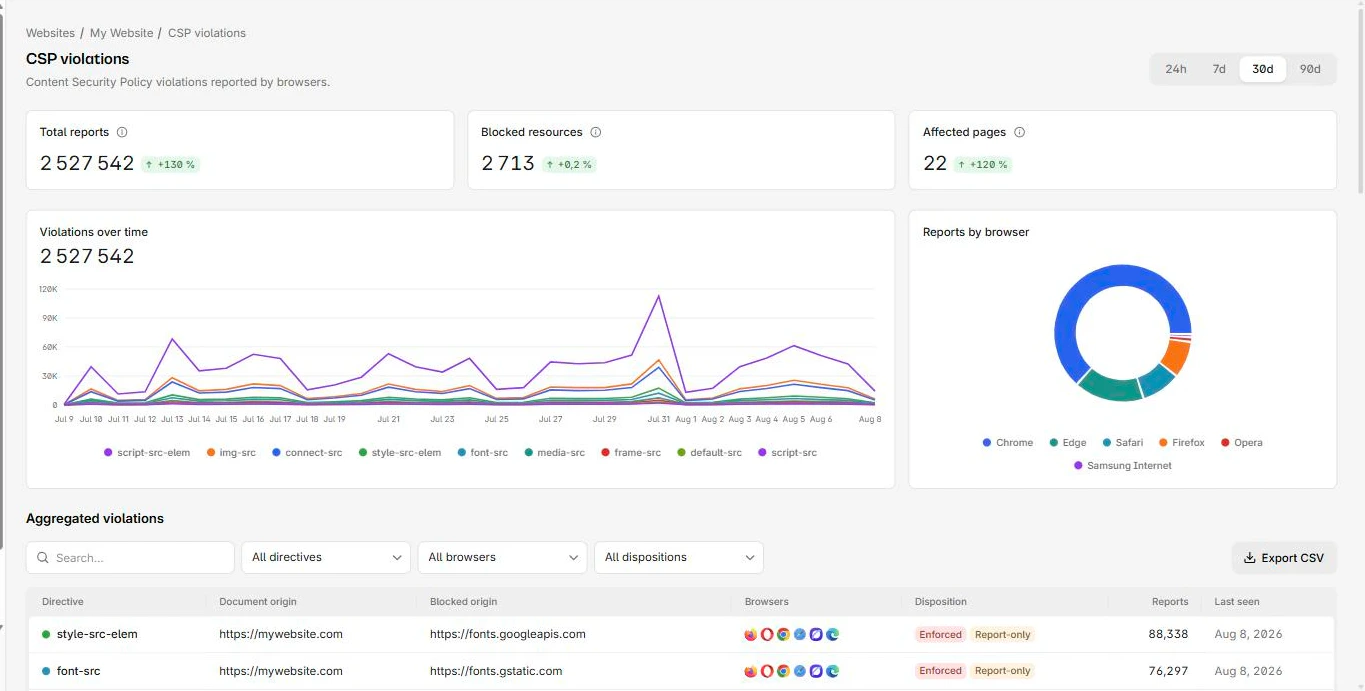
Every step above depends on seeing what the policy blocks on real pages and real browsers, not just your laptop, where the third parties and edge cases never show up. CentralCSP collects the violation reports, groups them by directive and host, and shows you exactly which line to change next. For any inline script you genuinely must keep, generate its hash with the hash generator.
Next steps
- The full workflow: how to build a strong CSP.
- Set the header for your stack: CSP header in every framework.
- Handle third parties: CSP for Google services.
Tighten your CSP with real-traffic reports.