

CSP violations
Turn Content Security Policy violations into a policy that fits your site. Column meanings, the values that are not origins, and what not to allow.
Last update:
This page lists every resource your Content Security Policy (CSP) blocked, or would have blocked under a Report-Only header. Use it to build a policy that matches your site.
The page opens on its counters, a trend chart, and the aggregated violations table:
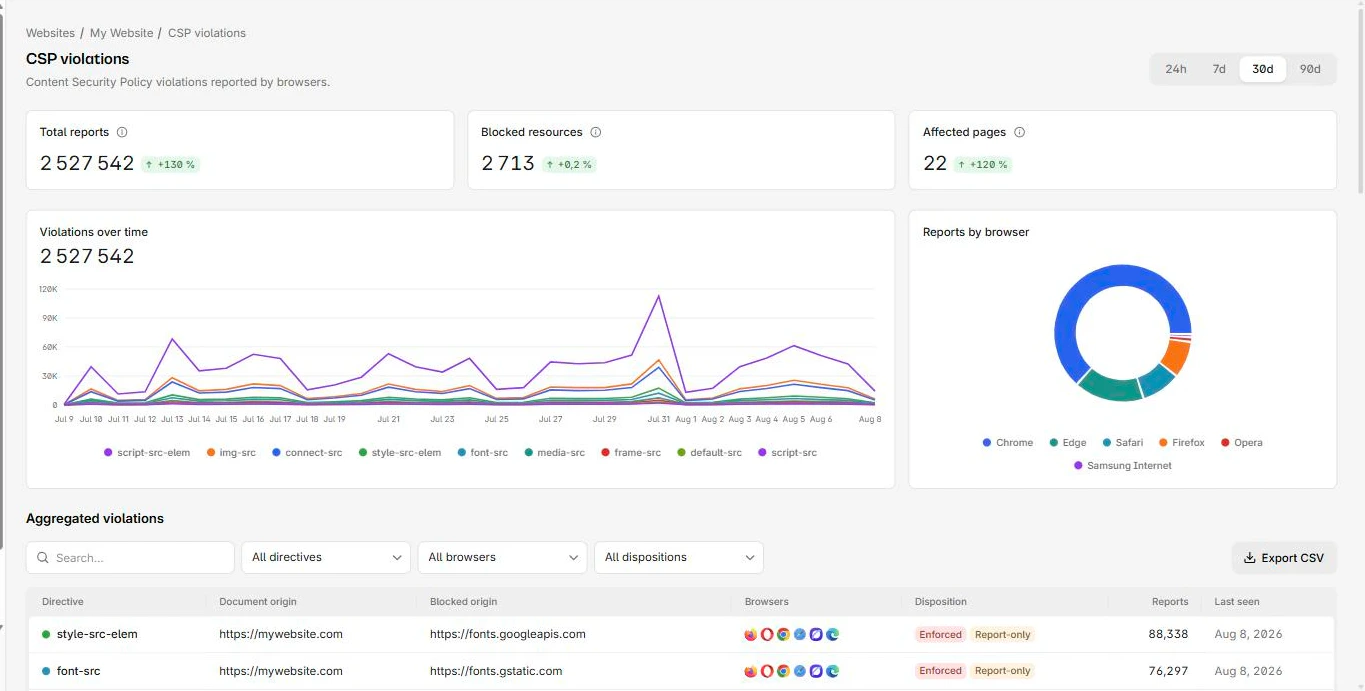
Columns
The violations table has these columns:
| Column | What it means |
|---|---|
| Directive | The CSP directive that fired, such as script-src or connect-src |
| Document origin | Origin of the page where it happened |
| Blocked origin | Origin of the resource that was refused |
| Browsers | Browsers that reported it |
| Disposition | Enforced means blocked, Report-only means it would have been |
| Reports | Reports collapsed into this row |
| Last seen | Most recent occurrence |
Work through a first batch
Work the first batch in this order:
- Filter to one directive. Each directive is a separate decision, and mixing them makes the list feel larger than it is.
- For each blocked origin, decide whether it belongs on your site. Your own CDN belongs. A vendor you recognize belongs. Something you cannot account for is the finding.
- Add what belongs to the policy, remove what does not from the site.
- Watch Last seen. A fixed entry stops appearing. That is your confirmation, not the report count, which keeps its history.
Before deploying a policy you have just edited, paste it into the CSP evaluator for a directive-by-directive review, and use the CSP scanner to read what a live page currently sends. To try a change without shipping it, the Chrome extension applies a policy locally on real pages and shows what it would block.
Non-origin blocked values
The following values mean the violation was about a kind of execution rather than a host, and adding something to an allowlist will not fix them:
| Value | What actually happened |
|---|---|
inline | An inline script or style ran |
eval | Code called eval or equivalent |
wasm-eval | WebAssembly was compiled from a string |
data | A data: URI was loaded |
inline and eval need the code changed, or a nonce or hash added. They are the violations worth reading first, because they are the ones a real attack produces.
Two traps
Two traps worth avoiding
Do not allow an origin just to silence a report. The report was the only thing telling you that resource loads at all.
Do not add 'unsafe-inline' to script-src. It switches off most of what CSP does for you. If inline scripts are unavoidable, use a nonce or a hash instead.
Noise you cannot fix
Browser extensions inject scripts into your pages and your policy reports them. The code is not yours and there is nothing to fix. Drop them at ingestion rather than reasoning about them each time, under Settings > Ingestion. For more information, refer to Ingestion filters.
Next steps
Explorer
Inspect individual browser reports with no aggregation. Pick a type, apply per-type facet filters, and read the stored JSON a browser actually sent.
CSP hashes
Find which scripts run on your pages and whether their content changed. Hash history is how you spot a third-party script that silently updated.