

CSP hashes
Find which scripts run on your pages and whether their content changed. Hash history is how you spot a third-party script that silently updated.
Last update:
Browsers report a hash of every script they execute when your policy carries 'report-sha256'. Use this page to answer two questions: who executes code on my pages, and did any of it change.
If the page is empty, 'report-sha256' is missing from your script-src. For more information, refer to Connect your site.
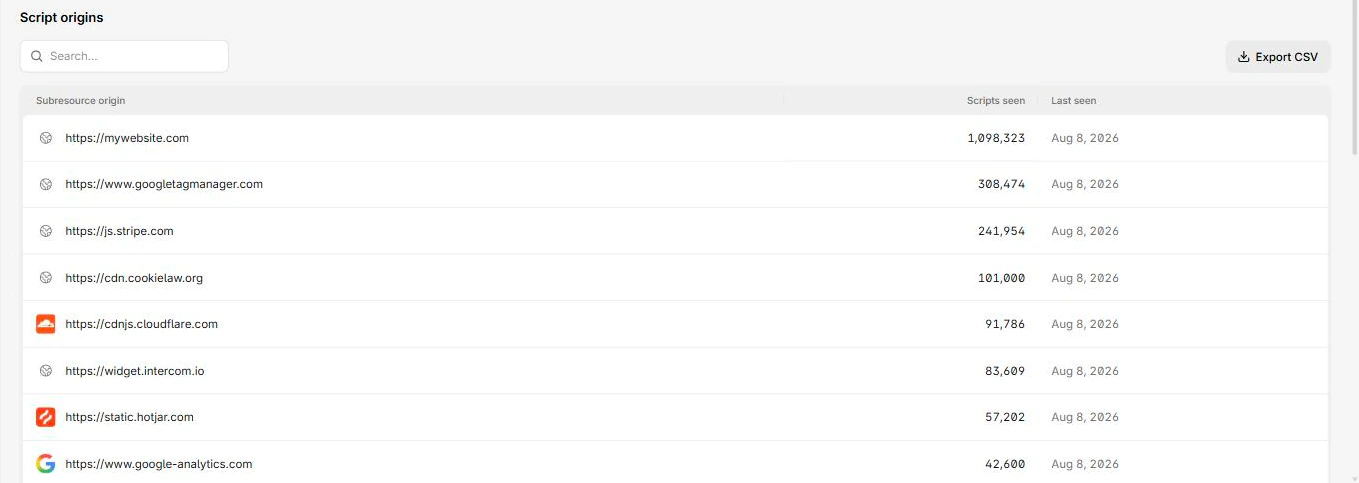
The page opens on hashes received, unique scripts, and the script origins table:
Columns
The top-level table groups by origin, because the origin is the unit of trust.
| Column | What it means |
|---|---|
| Subresource origin | Where the scripts came from |
| Scripts seen | Distinct scripts from that origin |
| Last seen | Most recent observation |
Open an origin to get its scripts, with Current hash alongside each URL. Each script records Pages, the document URLs it was seen on, and Hash history, every hash recorded for that URL with first and last seen.
Check whether a script reaches a payment page
Open the script, then the Pages tab. This is the direct answer to scope questions, and the fastest way to check it before it becomes a compliance question.
Read hash history
One script URL with several hashes means the content at that URL changed.
That is normal for a versioned bundle you deploy, and abnormal for a third-party script sitting at a stable URL. A vendor script that silently changes hash has the same shape as a supply-chain compromise and the same shape as a routine vendor deploy. The value here is that you can now tell the difference by asking, instead of never knowing it happened.
Three patterns are worth investigating:
- A third-party script changing hash outside its usual cadence.
- Any script changing without a corresponding release on your side.
- Any hash change on a script that appears on a payment page.
Use the inventory to record decisions
This page is for investigating. The script inventory is the same data with statuses, tags, justifications, and an audit trail attached, which is what PCI DSS evidence needs.
Next steps
CSP violations
Turn Content Security Policy violations into a policy that fits your site. Column meanings, the values that are not origins, and what not to allow.
Integrity violations
Scripts that loaded without valid Subresource Integrity metadata. Every entry has the same fix, and two cases where that fix does not apply.