

Integrity violations
Scripts that loaded without valid Subresource Integrity metadata. Every entry has the same fix, and two cases where that fix does not apply.
Last update:
This page lists scripts that loaded without valid Subresource Integrity (SRI) metadata, or with metadata that did not match. Each row is a script whose content nobody verified.
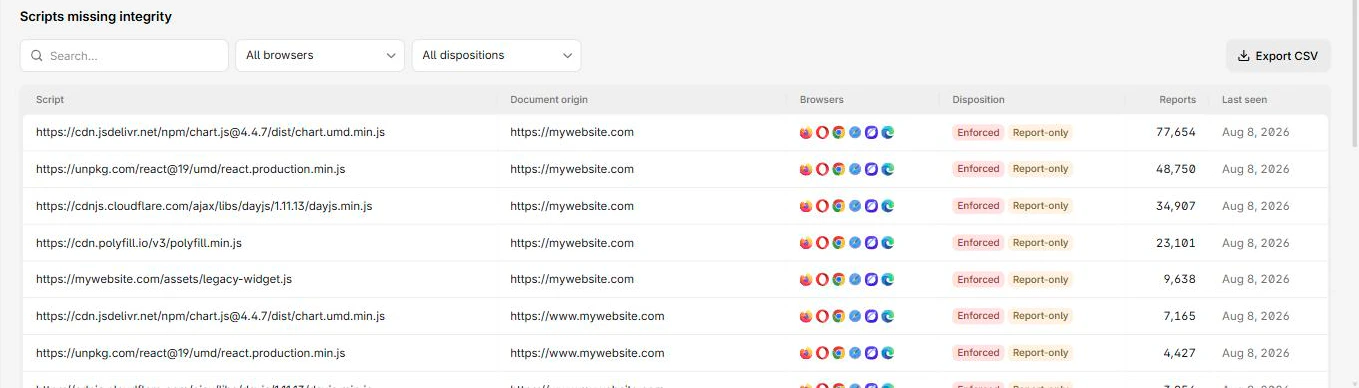
Each script is listed with the document origin that loaded it, the browsers that reported it, and its disposition:
Columns
The report table has these columns:
| Column | What it means |
|---|---|
| Script | The script that failed the check |
| Document origin | The page that loaded it |
| Browsers | Browsers that reported it |
| Disposition | Enforced means blocked, Report-only means it would have been |
| Reports | Reports collapsed into this row |
| Last seen | Most recent occurrence |
Drilling in adds Destination, which tells you what the browser was fetching the resource as.
The fix
Add an integrity attribute with the correct hash, plus crossorigin so the browser can verify it:
<script
  src="https://cdn.example.com/lib.js"
  integrity="sha384-oqVuAfXRKap7fdgcCY5uykM6+R9GqQ8K/uxy9rx7HNQlGYl1kPzQho1wx4JwY8wC"
  crossorigin="anonymous"></script>
Generate hashes at build time. Hand-maintained integrity attributes go stale on the next vendor update and turn into outages, which is the usual reason teams abandon SRI after trying it.
For a one-off value, the SRI generator computes the hash from a script or stylesheet URL. It also checks the CORS headers verification needs, which is the other half of why SRI silently fails.
Two cases the fix does not cover
A URL whose content changes on every request cannot carry a static hash. Pin it to a versioned URL first, then add integrity.
A vendor that will not publish stable versioned assets is a supply-chain decision, not a markup problem. Your options are hosting a copy yourself, dropping the dependency, or accepting unverified content and monitoring it through CSP hashes instead.
Overlap with CSP hashes
A script appearing on both pages is one you know is changing and have not pinned. CSP hashes records what everything hashed to. This page records where verification was expected and did not happen.
Next steps
CSP hashes
Find which scripts run on your pages and whether their content changed. Hash history is how you spot a third-party script that silently updated.
Permissions Policy
Size a Permissions Policy before enforcing it. The Potential view shows what iframes request, which is what breaks when you switch the header on.