

Permissions Policy
Size a Permissions Policy before enforcing it. The Potential view shows what iframes request, which is what breaks when you switch the header on.
Last update:
This page compares the browser features your pages and their iframes used against what your policy allows. Use it to size a policy before enforcing it.
Switch between the two views
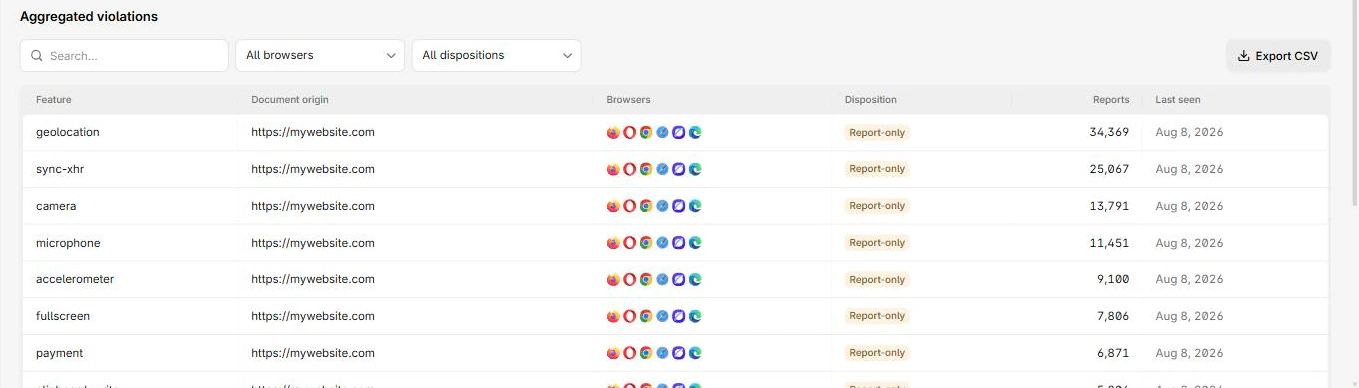
This page has two views, Violations and Potential. They answer different questions and are separate report types, so both are available only when your plan includes both.
- Violations: A feature your page used that the policy forbids. Something in your code called it.
- Potential: A feature an iframe requested beyond what your report-only policy would allow. The browser did not necessarily block anything. It is reporting which feature an embed requested.
The page opens on the Potential view:
Columns
Both views share these columns:
| Column | What it means |
|---|---|
| Feature | The browser feature, such as geolocation or sync-xhr |
| Document origin | The page involved |
| Browsers | Browsers that reported it |
| Disposition | Enforced means blocked, Report-only means it would have been |
| Reports | Reports collapsed into this row |
| Last seen | Most recent occurrence |
The Potential view's detail table adds Allow attribute and Iframe src. Together they identify exactly which embed asked for what, which is what you need to decide between widening the policy and calling the vendor.
Widen a feature you actually use
The generated starting policy denies three features outright:
Permissions-Policy-Report-Only: camera=(), microphone=(), geolocation=()An empty allowlist () means nobody, including your own page. If a feature you legitimately use appears in Violations, widen it:
-Permissions-Policy-Report-Only: camera=(), microphone=(), geolocation=()
+Permissions-Policy-Report-Only: camera=(), microphone=(), geolocation=(self)
Use self for your own page, or name the specific origins that need it. Do not widen to *.
Check Potential before you enforce
This is the step people skip. An iframe requesting a feature simply fails once you enforce, and depending on the vendor that can break a checkout rather than degrade quietly.
Review the Potential view, resolve anything on a payment or signup path, then switch the header to Permissions-Policy.
Next steps
Integrity violations
Scripts that loaded without valid Subresource Integrity metadata. Every entry has the same fix, and two cases where that fix does not apply.
Document Policy
Document-level rules your pages broke, such as document-write. Safer to enforce than most policies, with one exception worth checking first.