

Network errors
Requests to your site that failed, reported by the browser. Failures your server logs cannot contain, because the request never arrived.
Last update:
This page lists failed requests to your site, reported through Network Error Logging (NEL).
Your server logs only contain requests that reached your server. These are the ones that did not.
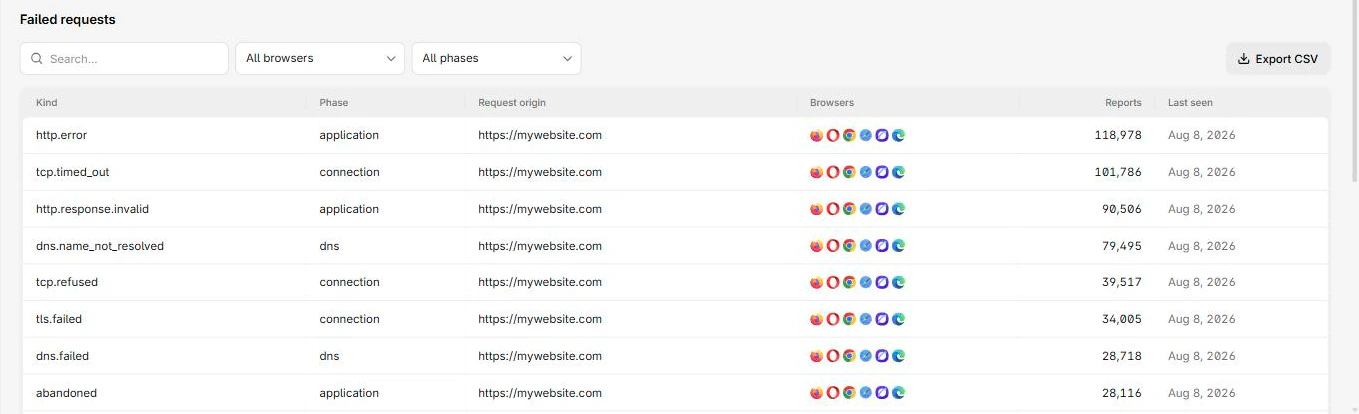
The Failed requests table lists each error kind, its phase, and the origin that failed:
Columns
The Failed requests table has these columns:
| Column | What it means |
|---|---|
| Kind | The error type the browser classified it as |
| Phase | Where the request failed, DNS, connection, or application |
| Request origin | The origin being requested |
| Browsers | Browsers that reported it |
| Reports | Reports collapsed into this row |
| Last seen | Most recent occurrence |
There is no disposition column, because a network error is not a policy outcome.
Drilling in gives request-level rows directly, with Request URL, Server IP, Protocol, Method, and Status code. A blank status code means the response never got far enough to have one.
Use Phase to route the problem
The All phases filter has three fixed values, and each points at a different team.
| Phase | Failed at | Usually means |
|---|---|---|
dns | Name resolution | DNS misconfiguration, an expired record, or a resolver problem in one region |
connection | TCP or TLS | Certificate errors, protocol negotiation, firewall or peering trouble |
application | After connecting | The response itself failed or was cut short |
Filter by phase first. A dns cluster and an application cluster have nothing to do with each other and go to different people.
Read the geography
Network errors concentrated in one region or one network are usually not your problem to fix directly, but they are your problem to know about. A resolver failing in one country produces a total outage for those users and complete silence in your own monitoring.
Cross-reference Server IP in the detail view when you run multiple points of presence. One IP producing all the failures narrows it immediately.
Report count accuracy
A browser can only deliver a report on a later successful connection. Users who never come back never report, so the true failure count is higher than what you see, and worst during a total outage when reporting itself cannot get through.
Trends are meaningful. Absolute totals are not. A gap in the chart during an incident is evidence of the incident, not evidence it stopped.
Report volume controls
NEL only reports at all if both NEL and Report-To are live on the document response. The Reporting API configuration checker reads them back from a public URL, which is the quickest way to rule that out when this page is unexpectedly empty.
failure_fraction in your NEL header controls what proportion of failures browsers report. The generated header sets 1.0, meaning all of them:
NEL: {"report_to":"default","max_age":10886400,"failure_fraction":1.0}On a high-traffic site this can dominate your report quota. Lower it to sample failures at the browser rather than at ingestion. For more information, refer to Usage and limits.