

Crashes
Tabs that died on your pages. Failures your own error tracking cannot see, and why the visibility state changes how seriously to take one.
Last update:
The renderer, the browser process that draws your page, stopped running. This is not an exception and not a failed request.
Your own error tracking cannot see these, because JavaScript that reports errors cannot report the moment it stops executing.
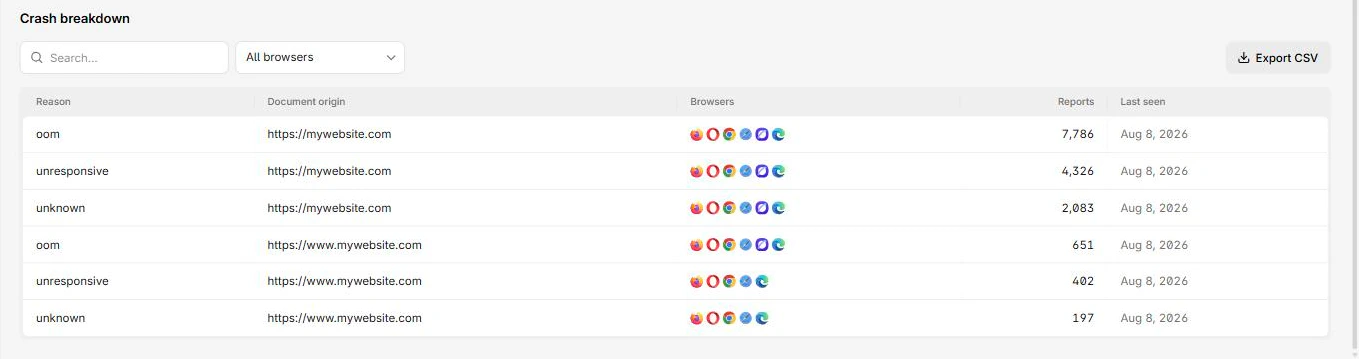
Crashes are broken down by reason, separating oom from unresponsive:
Columns
The report table has these columns:
| Column | What it means |
|---|---|
| Reason | Why the renderer died, using the browser's classification |
| Document origin | The page that was open |
| Browsers | Browsers that reported it |
| Reports | Reports collapsed into this row |
| Last seen | Most recent occurrence |
Drilling in adds Visibility, plus a stack trace where the browser supplies one.
Check visibility before prioritizing
This is the detail most people miss, and it changes the response entirely.
Backgrounded usually means the browser reclaimed memory under pressure. That is closer to normal operating behaviour than to a bug in your code.
Foreground means a user watched your site disappear. Treat those first, regardless of volume.
The oom reason
oom means the renderer ran out of memory. On a content site that normally points at a leak, an unbounded list, or images decoded at far higher resolution than they are displayed.
It correlates with long sessions and low-memory devices, which is exactly why it stays invisible in testing on a developer laptop.
Report count accuracy
The browser can only send a crash report after recovering, sometimes on a later visit, and a user who does not return never sends one. Treat totals as a minimum.
That makes trend the useful signal. A steady low level across many pages is normal and needs no action. A jump concentrated on one page after a release is a regression, and the release is where to look.
Next steps
Interventions
Requests the browser refused or changed on its own. You cannot stop them, so the question is whether your code handles the outcome.
Connection allowlist
Connections your pages attempted outside the allowlist. Build the list from observed traffic, then narrow it. A permissive list is a record, not a control.