

Document Policy
Document-level rules your pages broke, such as document-write. Safer to enforce than most policies, with one exception worth checking first.
Last update:
Document Policy sets rules about how a document behaves, rather than what it loads. Legacy APIs such as document.write, oversized images, and synchronous scripting are the usual targets.
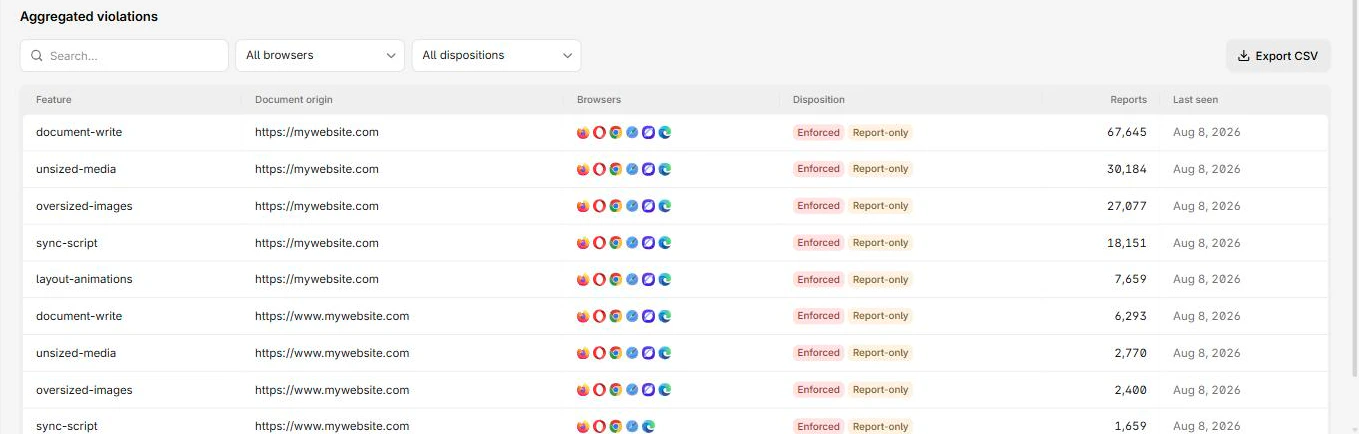
Violations are grouped by feature, with enforced and report-only dispositions:
Columns
The report table has these columns:
| Column | What it means |
|---|---|
| Feature | The policy feature that fired, such as document-write |
| Document origin | The page involved |
| Browsers | Browsers that reported it |
| Disposition | Enforced means blocked, Report-only means it would have been |
| Reports | Reports collapsed into this row |
| Last seen | Most recent occurrence |
Drilling in groups by page and source file, which is normally enough to find the code without guessing.
The default rule
The generated header block forbids one API:
Document-Policy-Report-Only: document-write=?0document-write=?0 forbids document.write. Good first rule: the API is slow, blocks rendering, and is almost always a leftover rather than a decision.
Entries usually trace to an old tag manager snippet, a third-party script from an era when document.write was normal, or an unrevisited polyfill. Your own code is the easy fix. For a vendor script, ask the vendor to remove the call or load the script differently.
Enforce the policy
Safer than most policies, because the consequence is usually a degraded feature rather than a broken page. Deploy in Report-Only, wait until this page is quiet, then switch the header.
The exception is checkout and payment flows, where a vendor script relying on a forbidden API can fail in ways that cost money. Walk those paths specifically before enforcing.
Next steps
Permissions Policy
Size a Permissions Policy before enforcing it. The Potential view shows what iframes request, which is what breaks when you switch the header on.
Deprecations
Browser APIs your pages still call that are scheduled for removal. The only place a browser warns you about a future outage before it happens.