

Ingestion filters
Control which origins may report to your endpoint and what gets stripped before storage. Restricting origins protects your quota.
Last update:
Ingestion settings decide what reaches storage. They run before anything is written, so a report a filter rejects is never stored and never counted against your usage.
Find them under the website's Settings > Ingestion. You need the website Manager role or higher to change them.
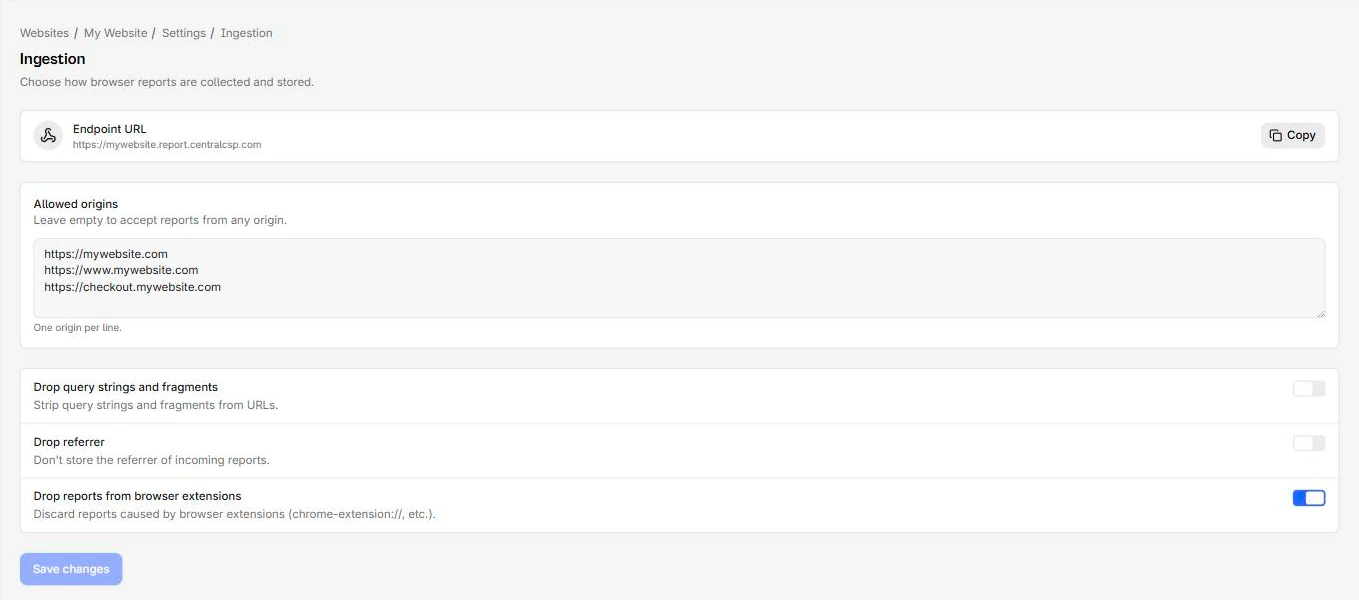
Allowed origins
A list of origins permitted to post reports to this endpoint, one per line.
Your reporting endpoint is a public URL with no authentication, which is how the Reporting API works. Browsers post to it directly and cannot carry a secret. If Allowed origins is empty, the endpoint accepts reports from any origin on the internet, and anyone who finds the URL can flood it and exhaust your monthly quota.
Filling it in is the single most useful thing on this page.
https://example.com
https://www.example.com
https://checkout.example.com
List every origin that legitimately serves your headers, including the www variant and any subdomain that reports separately. An origin is scheme plus host plus port, so https://example.com and http://example.com are different entries.
If reports stop arriving right after you edit this list, the list is the first thing to check.
The Ingestion tab holds the origin list and the three privacy toggles:
Privacy filters
Three toggles decide what is stripped from a report before it is stored. All three are off when you create a website through the wizard.
Drop query strings and fragments
Strips everything after ? and # from the URLs in a report.
Turn this on when your URLs carry session tokens, password reset codes, search terms, or anything else you would rather not retain for 90 days. The cost is that two pages differing only by query string collapse into one entry, which usually makes reports easier to read rather than harder.
Drop referrer
Discards the referrer of incoming reports.
The referrer occasionally helps trace which page led to a violation, but it is also a common carrier of internal URLs you did not mean to store.
Drop reports from browser extensions
Discards reports whose source is an extension scheme such as chrome-extension://.
On most public sites this is the largest single source of meaningless CSP violations. A visitor's ad blocker or password manager injects a script, your policy reports it, and there is nothing you can do about it because the code is not yours. Turning this on cuts noise substantially and is a good default.
Save and verify
Select Save changes. Settings apply to reports arriving from that point on, and nothing already stored is altered.
To confirm the change took effect, open the Explorer and look at reports newer than the change.
Next steps
Custom subdomain
Replace the random endpoint hostname with a name you choose. CentralCSP creates the DNS record, you update your headers afterwards.
Usage and limits
Track how many reports a website ingests, cap it so one site cannot drain the workspace quota, and choose who gets warned as the limit approaches.